 Feb 5, 2026
Table of Contents
This HRM software development guide is built from practical delivery experience and industry research, not theory alone. As organizations grow, HR operations become more complex—manual processes, disconnected tools, and limited visibility start to slow teams down. HRM software development helps businesses regain control by centralizing data, automating workflows, and supporting better workforce decisions at scale.
In this guide, we break down what HRM software development really involves, why it matters, how systems are built, what they cost, and how to choose the right approach—so teams can make informed, realistic decisions.
What Is HRM Software Development?
HRM (Human Resource Management) software development refers to the process of designing and building digital systems that help organizations manage their people-related functions more efficiently. These systems often centralize employee data, automate workflows like recruitment or payroll, and support the full employee lifecycle from hiring to performance evaluation. Modern HRM software combines multiple modules—such as attendance tracking, benefits administration, talent management, and analytics—into a unified platform that reduces manual work and improves data accuracy.
From experience, HRM software isn’t just another back-office tool; it becomes the backbone of how HR teams operate, especially as businesses grow. Instead of maintaining spreadsheets and paper-based records, companies can automate repetitive tasks, enforce consistent policies, and gain real-time insights into workforce trends—a shift that both improves operational efficiency and enables better decision-making.
The Growth of HRM Software in Businesses
The adoption and market size of HRM software are growing rapidly as companies of all sizes invest in digital HR capabilities. According to industry forecasts, the global HR software market was valued at roughly USD 16.4 billion in 2023 and is expected to more than double to about USD 36.6 billion by 2030, expanding at a compound annual growth rate (CAGR) of around 12.2 % through that period.
Broader reports show that the wider HR technology market—including HRM systems, workforce analytics, and automation tools—was estimated at about USD 43.7 billion in 2025 and is projected to reach nearly USD 96 billion by 2034 at a CAGR of about 9.2 %.
These trends reflect real business requirements:
- As organizations become more distributed and hybrid, HRM tools help manage workforce data consistently.
- SMEs and large enterprises alike are moving toward cloud-based solutions for scalability and lower maintenance.
- Investment in talent, performance, and compliance modules is increasing as companies compete for skilled workers.
From my own experience working with organizations across industries, the decision to adopt HRM software often follows a point where manual HR processes start hindering growth rather than supporting it—a clear signal of why this market continues expanding strongly.
Benefits of HRM Software Development
HRM (Human Resource Management) software provides both operational efficiency and strategic advantage. From experience working with organizations across sectors, the shift from manual HR processes to automated systems consistently leads to measurable improvements in productivity, data accuracy, and employee experience. Below are the core benefits, each supported by reliable industry evidence.
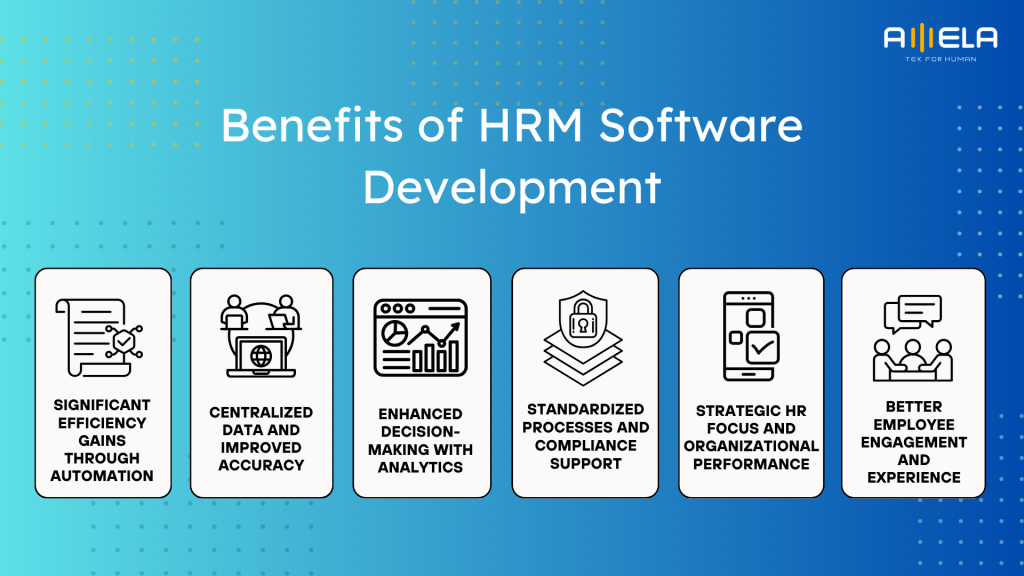
Significant Efficiency Gains Through Automation
HR platforms automate repetitive tasks such as payroll processing, time tracking, leave management, and benefits administration—replacing manual spreadsheets and paper forms. This reduces administrative effort and allows HR teams to focus on strategic value rather than routine work.
According to industry analyses, HR management systems streamline processes and provide valuable data-driven insights, helping HR teams save considerable time and effort on administrative work.
Centralized Data and Improved Accuracy
Without HRM software, employee information can be scattered across systems, leading to inconsistencies and errors. Centralizing data in a single platform ensures accuracy in payroll, attendance, performance records, and compliance reporting.
HR information systems (HRIS) are specifically designed to manage HR operations and provide timely, reliable workforce information, enabling HR professionals to perform high-value work instead of correcting errors.
Enhanced Decision-Making With Analytics
Modern HR systems include analytics tools that transform raw HR data into actionable insights. These tools help HR teams identify trends in hiring, retention, performance, and workforce planning, supporting evidence-based decisions rather than intuition.
Research shows HR analytics can improve performance measurement, retention, and productivity by revealing trends and issues that help shape better HR strategies.
Better Employee Engagement and Experience
HRM software often includes self-service features, social recognition tools, and performance feedback mechanisms that empower employees to manage certain HR interactions themselves. This improves transparency and engagement, contributing to a more positive employee experience.
Studies on HR analytics and technology adoption show that improved data access and engagement tools correlate with stronger employee satisfaction and retention outcomes.
Standardized Processes and Compliance Support
HRM systems enforce consistent policy application and automatically track compliance requirements, reducing legal and operational risk. Built-in workflows ensure that leave policies, performance cycles, and hiring steps are applied uniformly across the organization.
This standardization simplifies compliance reporting and reduces risks associated with manual tracking, especially in multi-location organizations.
Strategic HR Focus and Organizational Performance
With daily HR operations automated and data centralised, HR teams can pivot toward strategic priorities such as workforce planning, talent development, and culture initiatives. The adoption of HR tools supports long-term performance improvements beyond administrative tasks.
Systematic literature reviews link HR information systems with enhanced organizational performance by improving HR effectiveness and competitiveness.
In short, HRM software development modernizes how companies manage people by improving operational efficiency, data accuracy, analytics capability, and employee engagement—all of which contribute to stronger HR performance and business outcomes.
Key Types of HRM Software
HRM software is not a single category—it’s a family of systems built to solve different workforce problems at different organizational stages. Understanding how each type functions in practice helps teams avoid over-buying, under-building, or misusing HR technology.
Below is a deeper breakdown of the most common HRM software types, based on how they are actually used in organizations.
HRM (Human Resource Management) Systems
HRM systems are designed to run day-to-day HR operations efficiently and consistently. Their primary role is to replace manual, fragmented processes with standardized workflows.
Typical functions include employee record management, leave tracking, attendance monitoring, contract administration, and basic reporting. HRM systems are often process-driven, focusing on accuracy and consistency rather than advanced analytics.
In practice, HRM software is most effective for organizations that need operational control and visibility but do not yet require deep talent or workforce analytics.
HRIS (Human Resource Information Systems)
HRIS platforms place a strong emphasis on data integrity, compliance, and reporting. While they overlap with HRM systems functionally, their core value lies in acting as a reliable system of record for employee information.
HRIS systems support structured data management, historical record tracking, and compliance reporting. They are commonly used in regulated industries or multi-location organizations where audits, labor laws, and data accuracy are critical.
From experience, HRIS systems are often the backbone that other HR tools integrate with, rather than a standalone solution.
HCM (Human Capital Management) Systems
HCM systems take a long-term, strategic view of workforce management. Instead of focusing only on HR operations, HCM platforms connect people data with business outcomes.
In addition to core HR functions, HCM systems typically include performance management, learning and development, succession planning, workforce analytics, and skills tracking. These platforms help organizations understand not just who their employees are, but how their capabilities evolve over time.
HCM systems are most valuable in organizations where talent development, leadership pipelines, and workforce planning are directly tied to business growth.
TMS (Talent Management Systems)
TMS platforms specialize in managing the entire talent lifecycle, from attracting candidates to developing and retaining employees. Recruitment, onboarding, performance reviews, goal setting, and learning are often tightly integrated.
Unlike HRM systems, which focus on administration, TMS platforms focus on people development and performance optimization. They are commonly adopted by fast-growing companies where hiring quality, engagement, and retention significantly impact results.
In practice, TMS systems help HR teams shift from reactive hiring to proactive talent strategy.
CMS (Compensation Management Systems)
Compensation Management Systems address one of the most sensitive and complex HR areas: pay, incentives, and rewards. These platforms support salary planning, bonus calculations, incentive modeling, and pay-equity analysis.
CMS tools are especially useful during annual compensation cycles, where multiple stakeholders need visibility into budgets, performance alignment, and fairness. They help reduce manual errors and improve transparency in decision-making.
Organizations often introduce CMS platforms as they scale, when compensation complexity increases and spreadsheet-based planning becomes risky.
LMS (Learning Management Systems)
LMS platforms focus on employee learning, training, and skill development. They manage onboarding programs, internal courses, certifications, and continuous learning initiatives.
As businesses face rapid technological change, LMS systems play a critical role in reskilling and upskilling employees. They also support compliance training and knowledge standardization across teams.
In modern HR ecosystems, LMS platforms are often integrated with HCM or TMS systems to align learning with performance and career progression.
How These Systems Differ in Practice
While many vendors bundle multiple capabilities into a single platform, the underlying intent remains different:
- HRM and HRIS prioritize control, accuracy, and compliance
- HCM and TMS emphasize growth, performance, and long-term talent value
- CMS and LMS support specialized functions that become critical as organizations scale
Choosing the right mix depends on business maturity, workforce complexity, and strategic priorities—not feature volume. Understanding these distinctions helps organizations build HR systems that evolve with them, rather than constrain future growth.
HRM Software Development Process
A reliable HRM software development process starts with HR realities first, then translates them into secure workflows, clean data, and maintainable systems. From our experience building HR platforms, the biggest risk isn’t coding—it’s misunderstanding how HR actually works day to day.
Below is the step-by-step process we follow when developing HRM software, written in a practical, execution-ready way.
1) Align on the Business Goal and the “Why Now”
I start by asking what problem the business is trying to solve, because “we need an HRM system” is not a requirement. Some teams want to reduce payroll errors, others want to standardize onboarding across locations, and some need auditability.
In this step, I define:
- Primary outcomes (time saved, fewer errors, better visibility, compliance readiness)
- Who the system is for (HR, managers, employees, finance)
- What success looks like in measurable terms
This gives the project a clear north star instead of an endless feature wishlist.
2) Map Real HR Workflows and Policy Rules
Next, I map how work really flows—not how it appears in policy documents. HR processes contain exceptions everywhere: probation periods, overtime rules, approval chains, and local variations.
I document:
- Current workflows (as-is) and target workflows (to-be)
- Role-based responsibilities (HR vs manager vs employee)
- Policy rules that must be enforced (leave types, eligibility, cutoffs)
- Edge cases that break systems later (retroactive changes, transfers, resignations)
If we skip this step, the system will feel “correct” but still fail in real usage.
3) Decide Build vs Buy vs Hybrid
Before building, I evaluate whether a custom HRM is truly necessary. Many organizations do not need a full rebuild; they need a customized layer, integrations, or workflow automation on top of an existing platform.
I compare:
- Off-the-shelf platform fit vs custom needs
- Integration complexity (payroll, accounting, IDP, SSO)
- Data residency and compliance requirements
- Long-term maintenance cost
A hybrid approach is common: buy core HR records, build the workflows that differentiate the business.
Proof of Concept (PoC): Validating HRM Software Early
Before moving into full development, we recommend running a Proof of Concept (PoC) to validate the most critical assumptions of the HRM system. In our experience, this step helps avoid rework later, especially when HR rules, approvals, and integrations are involved.
Rather than building full features, the PoC focuses on testing key workflows—such as approval logic, role-based access, payroll or attendance rules, and integration feasibility. HR stakeholders can interact with early flows and confirm whether the system behaves as expected in real scenarios.
This step usually takes a short time but plays a big role in aligning expectations, refining scope, and confirming technical feasibility before committing to full-scale development.
Once validated, the project moves forward with system design and implementation on a much more solid foundation.
>>> Related: PoC in ERP Projects: How to Write?
4) Define Scope, Modules, and MVP Boundaries
Then I define what we build first and what we intentionally postpone. HRM projects fail when everything is built at once without adoption readiness.
A clean MVP usually focuses on:
- Employee profiles + org structure
- Leave + attendance
- Basic approvals and audit logs
- Reports needed by HR and leadership
Once adoption is stable, we expand into performance, learning, compensation, or analytics.
5) Design Data Model and Security Architecture Early
HR data is sensitive, so I treat security and data design as first-class requirements. In HRM systems, the data model decides whether the product can scale.
I define:
- Entity model (employee, contract, position, department, policy, approval)
- Role-based access control (RBAC) and permission boundaries
- Audit trail requirements (who changed what, when, why)
- Encryption and logging strategy
- Integration security (tokens, scopes, least privilege)
If these decisions come late, refactoring becomes painful and expensive.
6) UX Design Based on Roles and Frequency of Use
HRM software has multiple user types, and each uses the system differently. I design the UX by role and usage frequency: employees need speed, HR needs control, managers need visibility.
Typical UX decisions include:
- Employee self-service flows (leave requests, profile updates)
- Manager approvals with minimal friction
- HR admin screens built for bulk operations
- Clear error states and policy explanations
A good HRM UX reduces HR ticket volume—plain and simple.
7) Build Iteratively With Agile Releases
I avoid “big bang” builds. Instead, I deliver HRM features in small, testable increments.
A typical sprint flow:
- Prioritize workflows with highest business impact
- Build end-to-end slices (UI + API + data + permissions)
- Demo every sprint with HR stakeholders
- Adjust rules and edge cases early, before they spread
This approach keeps requirements grounded in reality and improves adoption.
8) Integrate With Payroll, Finance, and Identity Systems
Most HRM systems become valuable when they integrate with existing tools. This is usually where complexity appears.
Common integrations:
- Payroll system and attendance devices
- Accounting and cost-center mapping
- SSO (Google Workspace, Azure AD, Okta)
- Email/Slack/MS Teams notifications
- Learning or performance platforms
I design integrations as resilient pipelines, because HR data changes constantly.
9) QA, Security Testing, and Compliance Checks
HRM software needs strict testing because mistakes have real consequences: wrong payroll, incorrect leave balance, data exposure.
I validate:
- Rule-based workflows (policies, approvals, edge cases)
- Role and permission tests (RBAC coverage)
- Performance tests for HR bulk actions
- Security reviews for sensitive data flows
- Backup and recovery readiness
This is the step that prevents HR disasters later.
10) Pilot Rollout and Change Management
Even a perfect system fails without adoption. I roll out to a pilot group first, collect friction points, and refine workflows.
I typically plan:
- Pilot with one department or one location
- HR training + quick reference guides
- Feedback loop and rapid fixes
- Clear timeline for full rollout
HRM is a behavior change project, not just software delivery.
11) Full Launch, Monitoring, and Continuous Improvement
After rollout, I treat the HRM system as a product. We monitor usage, support HR, and iterate based on real needs.
Post-launch focus includes:
- Usage analytics and bottleneck tracking
- Support response process and SLA
- Roadmap for next modules (performance, compensation, analytics)
- Ongoing security patching and audits
This is where the system becomes a long-term operational asset.
>>> Related: Custom Software Development Guide
Key Features of HRM Software
Effective HRM software brings structure to HR operations while remaining flexible enough to adapt to real workforce behavior. Based on experience building and refining HR systems, the most successful platforms focus on a clear set of core features before expanding into advanced capabilities.
Below are the key features that should be included in a well-designed HRM system, explained in practical terms.
- Centralized Employee Information Management
At the core of any HRM system is a single, reliable source of truth for employee data. This includes personal details, contracts, job history, compensation records, and employment status.
Centralization reduces duplication, prevents data inconsistencies, and ensures that HR, managers, and finance teams are always working with accurate, up-to-date information.
- Leave, Attendance, and Time Tracking
Leave and attendance management is one of the most frequently used HR features. A good HRM system supports multiple leave types, approval workflows, accrual rules, and real-time balance tracking.
From experience, this feature alone significantly reduces HR queries and disputes when policies are enforced automatically and transparently.
- Payroll and Compensation Support
While payroll is sometimes handled by external systems, HRM software should at least support payroll-related data such as salary structures, allowances, deductions, and pay history. This feature ensures consistency between HR records and payroll calculations, reducing errors during pay cycles and audits.
- Role-Based Access Control and Security
HR data is highly sensitive, so access must be tightly controlled. Role-based access control ensures employees only see what they are allowed to see, managers access team-level data, and HR retains full administrative oversight. Clear permission boundaries are essential for data protection, compliance, and internal trust.
- Approval Workflows and Policy Enforcement
HR processes rely heavily on approvals—leave requests, profile updates, contract changes, and policy exceptions. HRM software should support configurable approval chains that reflect organizational structure. Automated workflows reduce manual follow-ups and ensure policies are applied consistently across teams.
- Performance and Goal Management
Many HRM systems include or integrate performance management features such as goal setting, reviews, and feedback cycles. These features help align employee objectives with organizational goals. In practice, performance modules are most effective once core HR processes are stable and widely adopted.
- Reporting and HR Analytics
Reporting tools allow HR teams and leaders to track headcount, turnover, attendance trends, and compliance metrics. Dashboards turn raw data into insights that support planning and decision-making. This feature shifts HR from reactive reporting to proactive workforce management.
- Employee Self-Service Portal
Self-service portals allow employees to update personal details, submit leave requests, access policies, and view documents without HR intervention. This feature improves employee experience while significantly reducing administrative workload for HR teams.
- Integration Capabilities
HRM software rarely operates in isolation. Integration with payroll systems, accounting tools, identity providers, and communication platforms is critical for seamless operations. Well-designed APIs and integration points prevent data silos and enable scalable HR ecosystems.
- Audit Trails and Compliance Support
HRM systems should automatically track changes to employee data, approvals, and policy decisions. Audit trails are essential for compliance, internal reviews, and resolving disputes. This feature becomes increasingly important as organizations scale or operate across jurisdictions.
In summary, strong HRM software prioritizes core operational features first—data accuracy, automation, security, and usability—before expanding into advanced modules. Building the right feature foundation ensures the system supports growth rather than becoming a constraint as workforce complexity increases.
HRM Software Development Cost
HRM software development cost depends far more on system complexity, scope, and delivery setup than on hourly rates alone. From experience, teams often underestimate cost not because vendors are expensive, but because HR workflows, security, and integrations are more complex than expected.
Below is a realistic cost breakdown, followed by the key factors that influence total investment.
Estimated HRM Software Development Cost by Complexity
The table below reflects typical cost ranges for building HRM software with professional engineering standards, role-based security, and scalable architecture.
| Complexity Level | Typical Scope | Estimated Cost (USD) | Development Timeline |
| Basic | Employee profiles, org structure, leave & attendance, approvals, basic reports | $25,000 – $50,000 | 2–4 months |
| Medium | Core HR + payroll support, RBAC, dashboards, integrations, self-service | $60,000 – $120,000 | 4–7 months |
| Advanced | Full HRM/HCM suite, performance, analytics, compliance, multi-region rules | $150,000 – $300,000+ | 8–12+ months |
These estimates assume modern web-based HRM systems with secure data handling and maintainable architecture.
Key Factors That Affect the Cost of HRM Software Development
HRM systems rarely fail because of features alone. Cost is shaped by structural decisions made early in the project.
System Scope and Functional Depth
The number of modules directly impacts cost, but workflow complexity matters more than feature count. Payroll rules, approval hierarchies, and regional labor policies significantly increase development and testing effort.
The deeper the policy logic, the higher the cost.
Data Security and Compliance Requirements
HR data includes personal, financial, and contractual information. Strong security, encryption, audit trails, and access control increase upfront cost but are non-negotiable in most environments.
Compliance-heavy industries or multi-country operations require additional safeguards.
Integration Requirements
Integrating with payroll systems, accounting software, identity providers (SSO), or attendance devices adds both development and testing complexity.
Poorly planned integrations are a common source of cost overruns.
Engagement Model
The delivery model strongly affects cost predictability:
- Project-based: Lower upfront clarity, higher change cost
- Dedicated team: Higher monthly spend, better flexibility for evolving needs. But you can lower cost with offshore development team.
- Hybrid model: Balanced cost and control for growing HR systems
Choosing the wrong model often increases total cost even if the initial estimate looks cheaper.
Development Region
Geographic location influences rates but not necessarily outcomes:
- Southeast Asia & Eastern Europe offer strong cost-to-quality balance. That’s why many businesses choose outsourcing software development services.
- Western Europe, Singapore, and the US have higher rates due to labor costs
Lower rates without HR domain experience often lead to rework and higher total cost.
Technology Stack and Architecture
Cloud-native architecture, scalable databases, and clean API design increase initial cost but reduce long-term maintenance and scaling expenses.
Short-term savings from cutting architectural corners usually result in higher total ownership cost.
UX Complexity and User Roles
HRM systems serve multiple user groups—employees, managers, HR admins, finance. Designing intuitive UX for each role increases design effort but significantly improves adoption and reduces support costs later.
In summary, HRM software development cost should be viewed as a long-term investment rather than a one-time expense. Teams that align scope, security, delivery model, and regional strategy early achieve better cost control and fewer surprises throughout the system’s lifecycle.
Case Studies: Comparing Popular HRM Software Platforms
Comparing leading HRM platforms side by side reveals how design philosophy, technology choices, and target users shape real-world strengths. Below is a deeper, more practical comparison that goes beyond feature lists to explain why each platform works well in certain contexts.
Detailed Comparison of Well-Known HRM Software
| HRM Software | Core Strengths | Key Functional Strengths | Technical Characteristics | Best Use Case |
| Workday | Unified data & enterprise scalability | Core HR, payroll, talent, advanced analytics | Single data model, cloud-native, in-memory processing | Large enterprises with complex org structures |
| SAP SuccessFactors | Deep talent management & SAP integration | Performance, learning, succession, global HR | Modular cloud apps, strong SAP ERP integration | Enterprises already using SAP |
| Oracle HCM Cloud | Analytics and AI-driven insights | Workforce planning, payroll, AI recommendations | Cloud-first, Oracle analytics & database stack | Data-driven HR organizations |
| BambooHR | Simplicity and fast adoption | Core HR, onboarding, reporting | Lightweight SaaS, intuitive UI | SMBs prioritizing ease of use |
| Zoho People | Flexibility and customization | Attendance, performance, workflow automation | API-driven SaaS, Zoho ecosystem | Growing teams needing adaptability |
Workday
Workday’s strongest advantage is its single, unified data model, which eliminates data duplication across HR, finance, and payroll. This makes reporting consistent and reliable at scale. From experience, Workday performs best in large enterprises where data accuracy and cross-department alignment outweigh implementation speed.
Trade-off: high implementation cost and longer rollout time.
SAP SuccessFactors
SuccessFactors excels in talent-centric HR, especially learning, performance management, and succession planning. Its tight integration with SAP ERP makes it a natural choice for organizations already invested in SAP infrastructure.
Trade-off: configuration complexity and reliance on SAP ecosystem expertise.
Oracle HCM Cloud
Oracle’s platform stands out for advanced workforce analytics and AI-driven insights. Features like predictive attrition analysis and skills modeling support strategic HR planning rather than purely operational tasks.
Trade-off: less intuitive UX for non-technical users compared to lighter platforms.
BambooHR
BambooHR’s strength lies in usability and speed of adoption. It removes friction from everyday HR tasks and works well for companies transitioning away from spreadsheets or basic tools.
Trade-off: limited scalability for complex, multi-country organizations.
Zoho People
Zoho People offers strong workflow flexibility and customization, especially when combined with other Zoho products. It supports growing teams that need tailored processes without enterprise-level cost.
Trade-off: advanced analytics and compliance features are less mature than enterprise platforms.
Key Insights From These Case Studies
- Enterprise platforms prioritize data integrity, governance, and scale, even at the cost of complexity.
- SMB-focused tools emphasize usability, speed, and affordability, with fewer layers of control.
- Technology choices reflect target users: unified data models and analytics engines for enterprises, modular SaaS for smaller teams.
FAQs About HRM Software Development
Below are the most common questions we hear from teams evaluating HRM software, based on real implementation discussions and recurring concerns.
When should a company develop or renew HRM software?
You should consider developing or renewing HRM software when manual processes start slowing down HR operations, data becomes inconsistent across systems, or existing tools no longer support company growth. This often happens during headcount growth, regional expansion, policy complexity, or after repeated payroll, attendance, or reporting issues.
How do I know if my current HRM system is outdated?
Common signs include frequent manual workarounds, limited reporting, poor user adoption, difficulty integrating with payroll or finance systems, and security or compliance gaps. If HR teams rely heavily on spreadsheets outside the system, the platform is likely no longer fit for purpose.
Is custom HRM software better than off-the-shelf solutions?
Custom HRM software works best when business workflows, policies, or integrations are highly specific. Off-the-shelf solutions are usually faster to deploy but may require compromises. Many organizations adopt a hybrid approach—using a standard platform for core HR and building custom modules where differentiation is needed.
How secure does HRM software need to be?
HRM systems handle sensitive personal and financial data, so strong security is essential. This includes role-based access, encryption, audit logs, secure integrations, and compliance with local data protection regulations. Security should be built into the system design, not added later.
Can HRM software support remote and hybrid teams?
Yes. Modern HRM platforms are commonly designed to support distributed workforces through self-service portals, digital approvals, remote onboarding, and centralized data access. These features have become standard rather than optional.
What departments should be involved in HRM software development?
HR should lead functional requirements, but IT, finance, legal, and management should be involved early. HRM software impacts payroll, compliance, budgeting, and employee experience, so cross-functional alignment reduces rework later.
What is the biggest mistake companies make with HRM software?
The most common mistake is focusing on features instead of workflows. HRM software succeeds when it reflects how people actually work, not how processes look on paper. Poor adoption usually signals a design or change-management issue, not a technical one.
Conclusion
A well-designed HRM software development initiative is not just an IT project—it’s a long-term operational investment. The right system improves efficiency, reduces risk, supports employee experience, and scales with organizational growth. This HRM software development guide shows that success depends on clear requirements, thoughtful feature prioritization, strong security, and a deep understanding of real HR workflows.
For organizations planning to go beyond HR and connect people management with finance, operations, and analytics, HRM is often a natural entry point into broader ERP capabilities. At AMELA Technology, teams work with businesses to design and build HRM, ERP solutions, and custom software systems that fit real operations—supporting growth without adding unnecessary complexity.