 Jan 28, 2026
Table of Contents
Mobile app maintenance is no longer optional—it’s a core part of owning a mobile product. According to Statista, there are over 5 million mobile apps available across major app stores today, and competition continues to intensify as user expectations rise. At the same time, both Apple and Google release major OS updates every year, forcing apps to adapt continuously or risk performance issues and store policy violations.
Based on our experience maintaining production apps, the real challenge isn’t launching an app—it’s keeping it stable, secure, and relevant as platforms, devices, and user behavior evolve. This guide breaks down what mobile app maintenance really involves, how much it costs, the benefits and challenges teams face, and the best practices that keep apps healthy long after launch.
What Is Mobile App Maintenance?
From our experience, mobile app maintenance is the ongoing work required to keep an app stable, secure, and relevant after it goes live. Launching an app is not the finish line—it’s the start of a new phase where real users, real data, and real devices expose issues that never appear in development or testing.
In practice, mobile app maintenance covers much more than bug fixing. It includes adapting the app to new OS versions, updating third-party SDKs, improving performance, patching security vulnerabilities, and refining features based on user feedback. We’ve seen apps with solid initial builds quickly lose ratings and users simply because maintenance was treated as optional. When handled properly, maintenance protects your initial investment and ensures the app continues to support business goals instead of becoming technical debt.
Types of Mobile App Maintenance
From our experience maintaining apps across multiple product stages, mobile app maintenance usually falls into a few clear types—each supporting a different aspect of long-term app success. Treating them separately helps teams plan effort, budget, and priorities more realistically.
- Corrective maintenance
This type focuses on fixing bugs that appear after release—crashes, broken flows, or issues caused by device or OS differences. In real projects, corrective maintenance is most active in the first few months after launch, when real user behavior surfaces edge cases that testing never caught. For example, an app might work perfectly in test environments but crash on a specific Android version used heavily in one market.
- Adaptive maintenance
Mobile platforms evolve constantly. Adaptive maintenance ensures the app continues to work when iOS or Android releases new versions, devices change screen sizes, or third-party SDKs update their APIs. From experience, skipping adaptive maintenance for even one major OS release often results in sudden crashes, store rejections, or negative reviews.
>>> Related: Cross-platform Application Development Guide
- Perfective maintenance
This type focuses on enhancements driven by user feedback and usage data—UI tweaks, performance improvements, smoother onboarding, or small feature refinements. We’ve seen perfective maintenance have a direct impact on retention and app ratings, even when no “big features” are added.
- Preventive maintenance
Preventive maintenance is about reducing technical debt before it becomes a blocker. This includes refactoring fragile code, cleaning up dependencies, and improving test coverage. From experience, teams that invest here spend less on emergency fixes later and maintain higher development velocity over time.
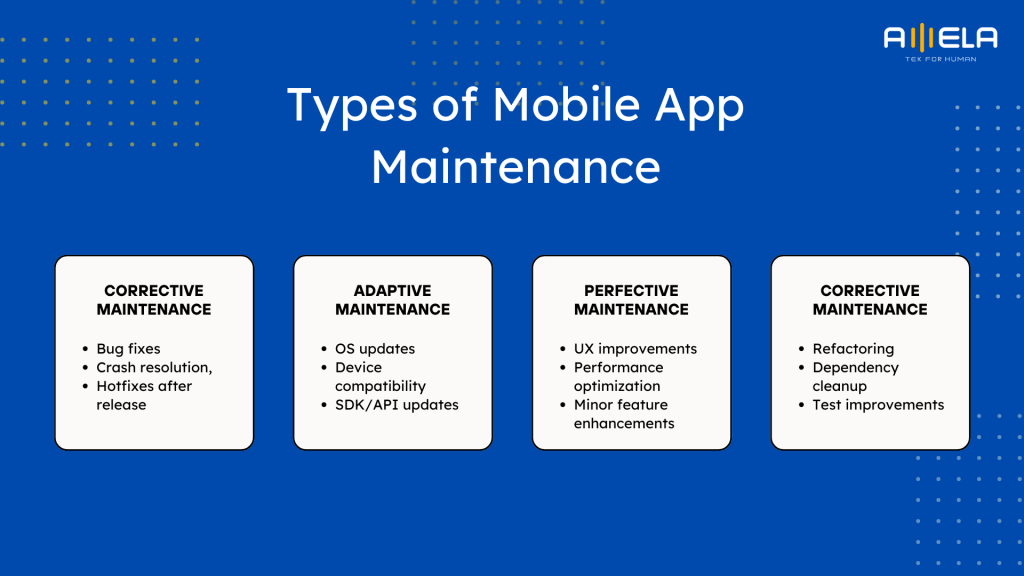
Most successful apps don’t rely on just one type of maintenance. They balance all four, adjusting emphasis as the product matures—from corrective early on to preventive and perfective as the app scales.
Mobile App Maintenance Cost
From our experience, mobile app maintenance cost is best understood in two layers: what drives the cost, and how much teams typically spend based on the type of maintenance required. Teams that only budget a flat percentage often miss where money actually goes—and that’s when surprises happen.
Key Factors Affecting Mobile App Maintenance Cost
- App complexity and feature depth
Apps with real-time features, payments, heavy backend logic, or multiple user roles require more frequent updates, testing, and monitoring. A simple utility app is far cheaper to maintain than a consumer app with live data and third-party integrations.
- Platform coverage (iOS, Android, cross-platform)
Maintaining one platform is manageable. Maintaining both iOS and Android—especially with native codebases—almost always increases effort due to OS differences, device fragmentation, and release timing. Cross-platform frameworks can reduce build effort but still require platform-specific fixes over time.
- Third-party SDKs and integrations
Every external dependency (analytics, payments, maps, messaging, ads) adds ongoing maintenance work. SDK updates, deprecations, and breaking changes are a recurring cost driver we see underestimated a lot.
- User base size and usage patterns
As user volume grows, maintenance shifts from reactive bug fixing to performance tuning, monitoring, and incident prevention. Popular apps don’t just cost more to build—they cost more to keep healthy.
- Security and compliance expectations
Apps handling payments, personal data, or enterprise workflows require regular security updates and reviews. This increases maintenance effort compared to content-driven or internal apps.
Application Maintenance Cost by Type
| Maintenance Type | What It Typically Covers | Cost Estimation |
| Corrective Maintenance | Bug fixes, crash resolution, hotfixes after release | 10–15% of initial development cost per year |
| Adaptive Maintenance | OS updates, device compatibility, SDK/API updates | 10–20% per year |
| Perfective Maintenance | UX improvements, performance optimization, and minor feature enhancements | 15–25% per year |
| Preventive Maintenance | Refactoring, dependency cleanup, and test improvements | 5–15% per year |
In practice, most active apps combine multiple maintenance types, so total annual maintenance often falls in the 15–30% of the initial mobile app development cost range.
Mobile app maintenance cost isn’t a penalty for poor development—it’s the price of staying relevant in fast-moving ecosystems. Teams that plan maintenance intentionally spend less over time than teams that delay updates and pay later through emergency fixes, lost users, and poor app store ratings.
Real Case Example: Mobile App Maintenance Cost in Practice
This is a Consumer Fintech mobile application maintenance cost case based on patterns we see repeatedly in production apps. Please note that the cost can change based on different factors.
App profile
- Platforms: iOS (Swift) + Android (Kotlin)
- Users: ~150,000 monthly active users
- Core features: user authentication, transaction history, push notifications, third-party payment integration, basic analytics
- Initial development cost: USD 120,000
Maintenance Scope After Launch (Year 1)
After launch, the app entered an active usage phase. Within the first year, maintenance covered all four types discussed earlier.
1. Corrective Maintenance
- Crash fixes after real user traffic
- Edge-case bugs on older Android devices
- Minor UI inconsistencies
Effort & cost
- ~1 developer + QA, part-time
- Cost: ~USD 10,000 (≈ 10% of initial build cost)
2. Adaptive Maintenance
- iOS major version update compatibility
- Android OS update adjustments
- SDK updates for payment and analytics providers
Effort & cost
- Periodic updates across the year
- Cost: ~USD 15,000 (≈ 15%)
3. Perfective Maintenance
- Onboarding flow optimization based on drop-off data
- Performance tuning for transaction screens
- Push notification logic refinement
Effort & cost
- Continuous small improvements
- Cost: ~USD 22,000 (≈ 18%)
4. Preventive Maintenance
- Refactoring fragile payment logic
- Dependency cleanup
- Improving automated test coverage
Effort & cost
- Short, focused refactoring cycles
- Cost: ~USD 10,000 (≈ 8%)
Total Annual Maintenance Cost (Year 1)
| Maintenance Type | Cost (USD) |
| Corrective | 12,000 |
| Adaptive | 18,000 |
| Perfective | 22,000 |
| Preventive | 10,000 |
| Total | 62,000 |
Total maintenance cost: ~USD 62,000/year ≈ , 52% of initial development cost (high because Year 1 is the most active)
From experience, the first year after launch is almost always the most expensive because:
- Real user behavior exposes hidden issues
- OS and SDK updates happen regardless of readiness
- UX improvements directly impact retention and ratings
By Year 2, maintenance for this app stabilized around 25–30% of the original development cost annually.
Benefits of Mobile App Maintenance
Consistent maintenance is one of the highest-ROI investments teams can make after launch. The benefits aren’t always obvious day to day, but over time, they directly affect user retention, revenue, security, and development velocity.
- Protects user experience and app store ratings
Bugs, crashes, and slow performance are the fastest ways to lose users. Regular corrective and adaptive maintenance keeps the app stable across devices and OS versions, which translates into better reviews and higher ratings. In practice, we’ve seen even small crash-rate reductions lead to noticeable improvements in store visibility and user trust.
->Ayn]%4Mu
- Reduces long-term cost by preventing technical debt
Preventive maintenance—refactoring, dependency cleanup, test improvements—costs far less than emergency fixes later. From experience, teams that invest consistently in preventive work spend less overall than teams that delay maintenance and pay through rushed rewrites or major stabilization efforts.
- Keeps the app compatible with evolving platforms
IBM estimates that fixing defects after release can cost up to 30x more than fixing them during development or early maintenance cycles. iOS and Android evolve constantly. Maintenance ensures your app remains compliant with new OS releases, device form factors, and store policies. Skipping this work often results in sudden breakage or app store rejections, which are far more expensive to fix under time pressure.
- Improves security and reduces risk exposure
OWASP reports that outdated dependencies remain one of the most common sources of mobile app vulnerabilities. Regular updates help patch vulnerabilities, update SDKs, and align with current security standards. For apps handling user data or payments, maintenance is essential for protecting both users and brand reputation. From experience, security incidents almost always cost more than proactive maintenance.
- Supports continuous improvement and business growth
Perfective maintenance allows teams to refine features based on real usage data rather than assumptions. Small, ongoing improvements to onboarding, performance, or flows often deliver outsized gains in retention and conversion—without the cost of major feature rebuilds.
- Extends the lifespan of the app
Well-maintained apps remain usable and valuable for years longer than apps that are “built once and forgotten.” Maintenance keeps the codebase adaptable, making future features easier and cheaper to implement.
Mobile app maintenance isn’t just about keeping things working—it’s about keeping the app competitive. Teams that maintain intentionally move faster, spend less over time, and avoid the cycle of constant firefighting that kills momentum.
Challenges of Mobile App Maintenance
From our experience maintaining live mobile apps over multiple years, the hardest part of mobile app maintenance isn’t fixing bugs—it’s managing change without slowing the product down. Below are the most common challenges we see in the field, along with why they matter in practice.
- Keeping up with OS and device fragmentation
iOS and Android release frequent updates, and device diversity—especially on Android—adds complexity. An app that works perfectly today can break tomorrow after an OS update. From experience, teams that don’t actively track OS betas and device trends often end up reacting under pressure instead of preparing calmly.
- Managing third-party SDK dependency risk
Modern apps rely heavily on external SDKs for payments, analytics, ads, and messaging. These SDKs change APIs, deprecate features, or introduce bugs outside your control. One small SDK update can cascade into crashes or broken flows if not tested carefully. This dependency risk is one of the most underestimated maintenance challenges.
- Balancing new features with maintenance work
Product teams naturally want to ship new features, while maintenance work feels invisible. The challenge is that delaying maintenance quietly increases technical debt, which later slows feature delivery. We’ve seen teams hit a wall where adding new features becomes harder than maintaining old ones—simply because maintenance was postponed too long.
- Performance degradation as usage grows
As user numbers increase, performance issues that didn’t exist at launch start to appear—slower load times, memory leaks, battery drain. These issues often surface gradually, making them easy to ignore until users complain or ratings drop. Diagnosing performance problems in production is far more complex than in development.
- Security maintenance without disrupting users
Security updates are essential but risky. Changing authentication flows, encryption libraries, or permission models can unintentionally break user sessions or data access. From experience, teams struggle most when security fixes are rushed instead of planned into regular maintenance cycles.
- Maintaining knowledge continuity over time
Team changes happen. When original developers leave, and documentation is weak, maintenance becomes slower and riskier. New engineers spend time understanding legacy decisions instead of fixing issues. This challenge compounds over time and directly affects application maintenance costs.
- Estimating maintenance effort accurately
Unlike development, maintenance work is unpredictable by nature. New OS releases, user behavior changes, or third-party updates don’t follow a neat roadmap. Teams that expect maintenance to be “light and occasional” often under-budget and end up firefighting.
Mobile app maintenance challenges grow with scale and time. The teams that succeed treat maintenance as a continuous discipline—planned, staffed, and measured—rather than an afterthought squeezed between feature releases.
>>> Related: Latest Mobile App Development Trends
Best Practices for Mobile Application Maintenance
The difference between smooth evolution and constant firefighting comes down to discipline and strategy. Below are the best practices we consistently apply to keep apps stable, scalable, and cost-efficient over time.
- Plan maintenance as a continuous workflow, not ad-hoc fixes
Successful teams don’t wait for bugs or user complaints. They schedule maintenance work into regular cycles—alongside feature development—so fixes, updates, and optimizations happen predictably. This keeps the app healthy without disrupting product momentum.
- Track OS and SDK changes before they go public
We monitor iOS and Android beta releases and major SDK updates early. This gives teams time to test and adapt before users are affected. In practice, this single habit prevents a huge amount of last-minute stress and emergency releases.
- Use data to guide maintenance priorities
Crash analytics, performance metrics, and user behavior data should drive decisions—not gut feeling. Focusing maintenance on high-impact issues (frequent crashes, slow screens, critical flows) delivers faster improvements with less effort.
- Invest in automated testing and CI/CD
Automation reduces regression risk and speeds up releases. From experience, apps with solid test coverage and automated deployment pipelines require fewer hotfixes and recover faster when issues appear.
- Keep dependencies and libraries under control
Regularly reviewing and updating third-party SDKs prevents sudden breakage caused by deprecations or security vulnerabilities. We avoid “big-bang” dependency upgrades, preferring small, frequent updates that are easier to test and roll back.
- Balance new features with preventive maintenance
Allocating time for refactoring and cleanup may not feel urgent, but it pays off. Teams that consistently invest in preventive maintenance maintain higher velocity and avoid the slowdown that comes from accumulating technical debt.
- Maintain clear documentation and knowledge sharing
Maintenance gets harder when knowledge lives only in people’s heads. We keep architecture notes, setup guides, and decision logs up to date so new engineers can contribute quickly and safely.
- Define ownership and response standards
Clear ownership for maintenance tasks—along with agreed response times for incidents—keeps issues from falling through the cracks. This is especially important as teams grow or are distributed across locations.
The best mobile app maintenance strategy is proactive, data-driven, and built into everyday delivery. When maintenance is treated as a core product activity—not a side task—apps stay reliable, adaptable, and competitive for the long run.
Conclusion
Effective mobile app maintenance is what separates apps that steadily grow from apps that slowly fade after launch. Bugs, OS updates, SDK changes, and shifting user expectations don’t wait—and apps that aren’t actively maintained pay the price through poor ratings, lost users, and rising technical debt.
From experience, teams that treat maintenance as a strategic, ongoing investment—not a reactive cost—spend less over time and move faster with confidence. Whether it’s corrective fixes, adaptive updates, performance improvements, or preventive refactoring, a structured maintenance approach protects both the product and the business behind it.
If you’re maintaining or scaling a mobile app and want a reliable partner to handle long-term support, performance optimization, or continuous improvement, AMELA provides mobile app development and maintenance services designed for stability, scalability, and cost efficiency—so your team can focus on growth while the app stays solid.