 Sep 27, 2026
Table of Contents
When an in-app support issue needs human attention, a poor handoff can leave agents searching for context while customers repeat the same information. AI agent assist for in-app support escalations can prepare that handoff by identifying escalation signals, gathering relevant context, and suggesting the next action.
The goal is not to replace human support. It is to make complex escalations faster and more useful by giving agents the information they need to resolve the issue.
What Is AI Agent Assist for In-App Support Escalations?
AI agent assist for in-app support escalations helps human support teams handle complex cases by detecting escalation signals, gathering context, and recommending the next action before a case reaches a specialist.
It is different from a conventional AI chatbot. A chatbot primarily tries to resolve the customer’s request directly. Agent assist supports the human when the issue becomes too complex, sensitive, or uncertain for automated resolution.
For example, a user may report that a payment failed after several attempts. Instead of simply transferring the conversation to a billing team, an AI agent-assist workflow can identify the account, summarize the conversation, check relevant transaction information, retrieve the applicable troubleshooting guidance, and prepare the case for the human agent.
The goal is not simply to escalate faster. It is to make the escalation more useful.
Why in-app context matters
An in-app support system can potentially access contextual signals that a standalone chatbot does not have, subject to the user’s permissions and the company’s data-access policies.
These might include:
- The product area where the issue occurred
- Recent actions taken by the user
- Relevant error messages
- Account or subscription status
- Previous support interactions
- Transaction or workflow context
- Troubleshooting steps already attempted
This reduces the amount of information the customer has to repeat and gives the human agent a more complete starting point.
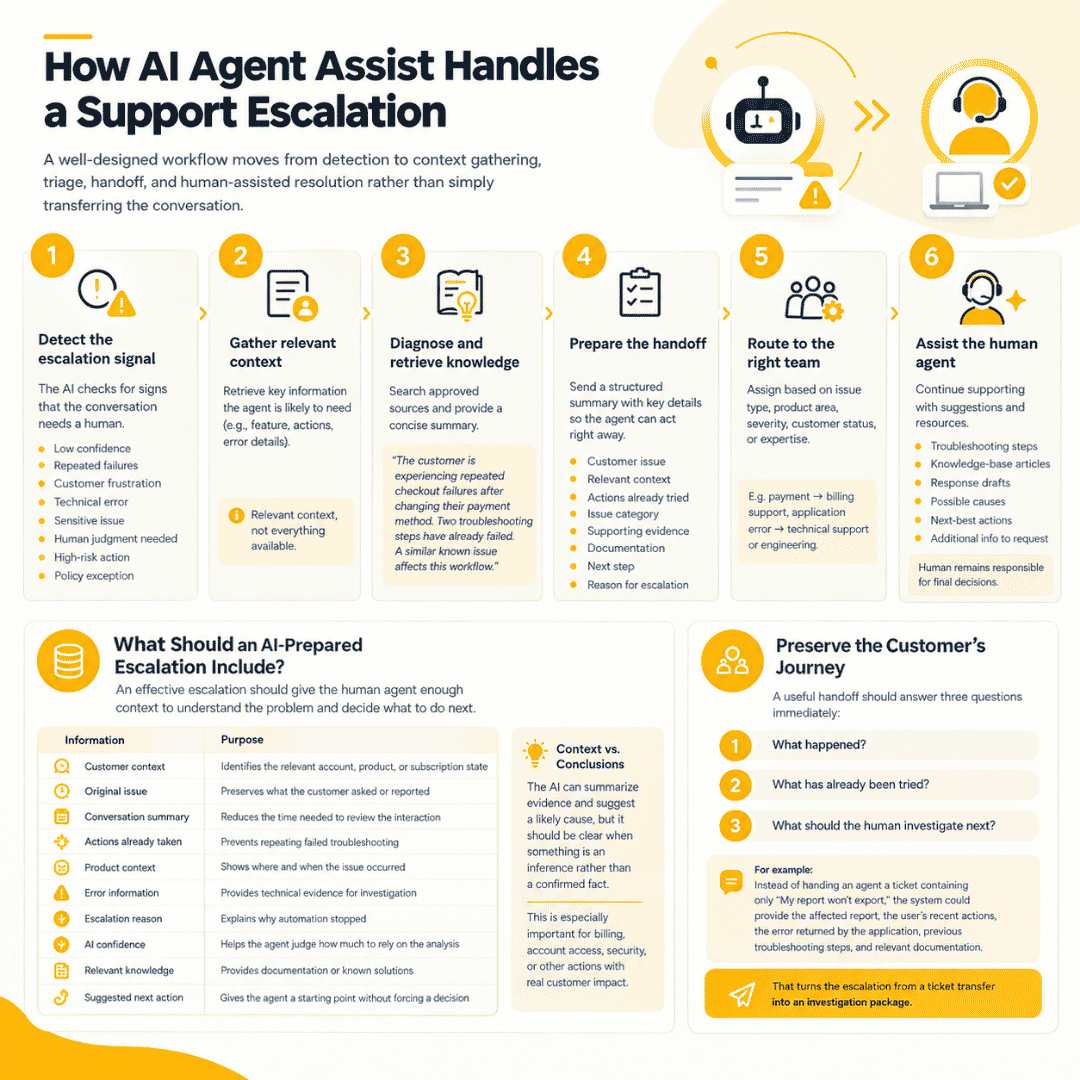
How AI Agent Assist Handles a Support Escalation
A well-designed workflow moves from detection to context gathering, triage, handoff, and human-assisted resolution rather than simply transferring the conversation.
1. Detect the escalation signal
The AI first determines whether the conversation should continue through automation or move to a human.
Possible signals include:
- Low confidence in the AI’s response
- Repeated unsuccessful troubleshooting
- Customer frustration
- A technical error
- A sensitive account or billing issue
- A request requiring human judgment
- A high-risk action
- A policy exception
The escalation rule should not rely on a single confidence score. Combining multiple signals can provide a more reliable decision.
2. Gather relevant context
Once escalation is triggered, the system retrieves information the assigned agent is likely to need.
For example, for a technical issue, the AI might collect the affected feature, recent user actions, error details, and previous troubleshooting attempts.
The system should retrieve relevant context, not everything available. Excessive information can make the handoff harder to understand and can introduce unnecessary data-access risks.
3. Diagnose and retrieve knowledge
The AI can search approved knowledge sources for troubleshooting documentation, product information, previous cases, or known issues.
It can then provide the human agent with a concise explanation such as:
The customer is experiencing repeated checkout failures after changing their payment method. Two troubleshooting steps have already failed. A similar known issue affects this workflow.
The agent can then investigate instead of starting from the original customer message.
4. Prepare the handoff
The escalation should arrive with a structured summary containing:
- Customer issue
- Relevant context
- Actions already attempted
- Likely issue category
- Supporting evidence
- Relevant documentation
- Suggested next step
- Reason for escalation
This is where AI can provide some of its most practical value. The customer should not have to explain the same problem again simply because the case moved from an automated workflow to a human one.
5. Route to the right team
The system can then route the case according to factors such as issue type, product area, severity, customer status, or required expertise.
A payment problem may go to billing support, while a recurring application error may require technical support or engineering investigation.
6. Assist the human agent
The AI can continue supporting the agent after the handoff by suggesting:
- Relevant troubleshooting steps
- Knowledge-base articles
- Response drafts
- Possible causes
- Next-best actions
- Additional information to request
The human remains responsible for decisions where judgment, authorization, or accountability is required.
What Should an AI-Prepared Escalation Include?
An effective AI escalation should give the human agent enough context to understand the problem, see what has already happened, and decide what to do next without making the customer start over.
A useful escalation payload can include:
| Information | Purpose |
| Customer context | Identifies the relevant account, product, or subscription state |
| Original issue | Preserves what the customer actually asked or reported |
| Conversation summary | Reduces the time needed to review the interaction |
| Actions already taken | Prevents the agent from repeating failed troubleshooting |
| Product context | Shows where and when the issue occurred |
| Error information | Provides technical evidence for investigation |
| Escalation reason | Explains why automation stopped |
| AI confidence | Helps the agent judge how much to rely on the AI analysis |
| Relevant knowledge | Provides documentation or known solutions |
| Suggested next action | Gives the agent a starting point without forcing a decision |
The important distinction is between context and conclusions.
The AI can summarize evidence and suggest a likely cause, but the system should make it clear when something is an inference rather than a confirmed fact. This is particularly important when the escalation involves billing, account access, security, or other actions with real customer impact.
Preserve the customer’s journey
A useful handoff should answer three questions immediately:
What happened?
What has already been tried?
What should the human investigate next?
For example, instead of handing an agent a ticket containing only “My report won’t export,” the system could provide the affected report, the user’s recent actions, the error returned by the application, previous troubleshooting steps, and relevant documentation.
That turns the escalation from a ticket transfer into an investigation package.
Where AI Agent Assist Can Improve Escalation Workflows
The strongest use cases are usually the repetitive parts surrounding an escalation: gathering information, summarizing cases, retrieving knowledge, routing tickets, and preparing agents for the next action.
Reduce repetitive information gathering
Support agents often spend time collecting information that already exists elsewhere in the company’s systems.
With appropriate access controls, an AI workflow can bring relevant information into the support case instead of requiring the agent to search across multiple tools.
Improve tier-1 to tier-2 handoffs
A tier-2 specialist should not have to reconstruct the entire conversation before investigating the actual problem.
AI-generated summaries and structured escalation fields can provide a consistent handoff format.
Support technical investigation
Some customer issues eventually require engineering involvement.
An AI system can organize error messages, relevant events, troubleshooting attempts, and other approved technical signals before the case reaches an engineering queue.
For more technical workflows, AI incident triage and root cause analysis can complement this approach by applying AI to the investigation of incidents and potential causes.
Identify recurring escalation patterns
Escalations are also a source of product information.
If hundreds of customers are repeatedly escalated for the same workflow, the problem may not be a support-training issue. It could indicate:
- A confusing product flow
- Missing documentation
- A recurring software defect
- An integration problem
- An unclear policy
- A limitation in the existing automation
Analyzing escalation patterns can therefore help product and engineering teams address the source of repeated support demand rather than only processing the resulting tickets.
Designing the Technical Architecture
A production AI escalation workflow needs more than an AI model; it needs controlled access to application context, knowledge, support systems, and escalation logic.
A simplified architecture can look like:
In-app support → Context layer → AI agent → Knowledge/data retrieval → Escalation engine → Support platform → Human agent
Context and retrieval
The AI agent should retrieve only the information needed for the specific case.
A retrieval layer can connect approved sources such as:
- Product documentation
- Knowledge bases
- Support history
- Application APIs
- Account information
- Incident records
This approach is generally more practical than giving the AI unrestricted access to every internal database.
Integration layer
The AI agent may need to interact with the existing support stack, CRM, product APIs, authentication systems, analytics tools, or ticketing platform.
The integration layer determines what the AI can read, recommend, and execute.
That distinction is important.
A support AI might be allowed to retrieve a customer’s subscription status and recommend a resolution, while requiring human approval before changing the subscription itself.
Read – Recommend – Act
A useful way to design permissions is to separate actions into three levels:
Read: Retrieve approved information.
Recommend: Analyze information and suggest an action.
Act: Execute a change in a connected system.
The further an AI agent moves toward autonomous action, the stronger the authorization, validation, and audit controls should become.
For organizations that need broader ongoing support across infrastructure, applications, and IT operations, managed IT services can provide a wider operational layer around these workflows rather than treating AI escalation as an isolated feature.
Security and Human Oversight
AI support agents should have access only to the information and actions required for their assigned workflow, with human review for decisions that could materially affect customers or systems.
An in-app support agent may need customer, account, or application data to understand an escalation. That access should be limited by role and purpose rather than giving the AI broad access to internal systems.
Key controls include:
- Data minimization: Retrieve only relevant customer and product information.
- Authentication: Verify that the user is authorized to access the requested information.
- Authorization: Separate what the AI can read from what it can change.
- Audit logs: Record important AI recommendations and actions.
- Human approval: Require review for sensitive or irreversible actions.
- Prompt/input protection: Consider attempts to manipulate the AI through customer-provided content.
- Data retention: Define how support conversations and AI-generated information are stored.
- Vendor controls: Understand how external AI services process customer data.
Companies should also assess broader security risks with AI apps before connecting an AI agent to production systems.
Human oversight should follow the risk
Not every escalation requires the same level of human intervention.
For example:
Low risk: AI suggests a relevant help article → agent can accept or ignore it.
Moderate risk: AI recommends a troubleshooting action → agent reviews before sending it.
High risk: AI recommends changing account permissions or processing a sensitive request → human authorization is required.
This risk-based approach allows companies to automate repetitive support work without assuming that every AI recommendation is safe to execute automatically.
How to Measure AI Agent Assist for Support Escalations
Measure whether AI makes escalations faster and more useful, not simply whether it reduces the number of cases reaching human agents.
Useful metrics include:
| KPI | What it tells you |
| Time to human handoff | How quickly complex cases reach the right person |
| Escalation accuracy | Whether cases are being escalated appropriately |
| Time to resolution | Whether AI helps agents resolve escalated cases faster |
| First-contact resolution | Whether the issue is resolved without repeated transfers |
| Agent suggestion acceptance | How useful AI recommendations are in practice |
| Reopened cases | Whether the initial resolution was effective |
| Customer satisfaction | Whether the experience improves |
| Human override rate | How often agents reject AI recommendations |
One metric deserves particular attention: escalation rate.
A lower escalation rate is not automatically a positive result. If an AI system avoids escalating difficult cases simply to improve its containment metric, customers may experience longer resolution times or incorrect answers.
Research from Tuck School of Business similarly highlights that agentic AI can improve aspects of customer service while still creating challenges around service quality and human interaction.
The better objective is:
Resolve straightforward issues automatically and make complex human escalations more effective.
Common Mistakes When Deploying AI for Support Escalations
Most problems come from optimizing the AI for automation volume instead of designing the complete escalation workflow around customer outcomes.
- Escalating without context
Moving a conversation to a human without its history simply transfers the work rather than reducing it.
- Giving the AI unrestricted access
An AI agent should not automatically receive access to billing, administrative, or customer-management systems just because those systems contain potentially useful information.
- Optimizing for containment
A high automation rate means little if difficult cases are being handled poorly. Resolution quality should remain part of the evaluation.
- Treating every escalation the same
A password problem, payment dispute, technical defect, and security concern should not necessarily follow the same escalation path.
- Ignoring human-agent feedback
Support agents are often the people best positioned to identify whether AI summaries, suggested actions, and routing decisions are actually useful.
Their feedback should become part of the evaluation and improvement loop.
How to Start an AI Agent Assist Pilot
Start with one escalation workflow, define measurable success criteria, and keep a human in the loop until the system demonstrates reliable performance.
Trying to connect an AI agent to every support channel and internal system at once creates unnecessary complexity. A focused pilot makes it easier to identify whether the workflow actually improves support operations.
1. Choose one escalation category
Start with a case type that occurs frequently and has enough historical data to evaluate.
Examples include:
- Technical errors
- Billing exceptions
- Account-access issues
- Product configuration problems
Avoid starting with the most sensitive or ambiguous workflow.
2. Define escalation rules
Specify when the AI should continue assisting the customer and when it should involve a human.
Rules can combine:
- AI confidence
- Conversation signals
- Error types
- Customer requests
- Number of failed troubleshooting attempts
- Risk level
The objective is not to eliminate human escalations. It is to make them consistent and appropriately timed.
3. Build the context and handoff layer
Connect only the systems required for the pilot. Define exactly what information the AI can retrieve and what it can send to the support platform.
Then standardize the escalation payload so every human agent receives the same essential information.
4. Test against historical cases
Before going live, replay representative support cases through the workflow.
Evaluate whether the AI:
- Escalates the right cases
- Captures relevant context
- Avoids unsupported conclusions
- Retrieves useful documentation
- Produces accurate summaries
- Routes cases correctly
Historical cases are particularly useful because the team can compare the AI-generated escalation with the actual resolution.
5. Launch with human oversight
During the initial production phase, agents should be able to review, correct, or reject AI recommendations.
Their corrections provide valuable feedback for improving escalation rules, retrieval, prompts, and workflow logic.
6. Measure and iterate
After launch, compare the pilot against the original baseline.
If time to resolution improves while customer satisfaction and escalation accuracy remain stable, the workflow has evidence to expand.
Research on production customer-support agents also highlights the importance of evaluation pipelines, context engineering, human-in-the-loop iteration, and ongoing measurement when deploying these systems in real-world environments. (arxiv.org)
Conclusion
AI agent assist for in-app support escalations should not simply decide when to transfer a customer. Its real value is making the transfer faster, more informed, and easier for the human agent to act on.
A practical implementation starts with a focused escalation workflow, controlled access to customer and product context, structured handoffs, and clear human oversight. From there, teams can measure resolution quality and gradually expand automation.
For companies looking to integrate AI into broader support and IT operations, AMELA can help design and develop the underlying applications, integrations, and managed workflows.
FAQs
What is AI agent assist for in-app support escalations?
It is an AI-powered workflow that helps human support agents handle complex in-app cases by detecting escalation needs, gathering context, retrieving relevant knowledge, and suggesting next actions.
How does AI detect when a support issue needs escalation?
It can use factors such as low confidence, repeated failed troubleshooting, customer requests for human assistance, technical errors, sensitive requests, and predefined business rules.
What information should AI include in a support handoff?
A useful handoff can include the customer’s issue, conversation summary, relevant account and product context, actions already attempted, escalation reason, supporting evidence, and suggested next steps.
Can AI agent assist replace human support agents?
It can automate some repetitive support activities, but complex, sensitive, or high-risk cases often still require human judgment. Agent assist is designed to improve the human workflow rather than automatically eliminate it.
How do you measure AI support escalation performance?
Track metrics such as escalation accuracy, time to human handoff, time to resolution, first-contact resolution, customer satisfaction, reopened cases, agent acceptance of AI suggestions, and human override rates.
What are the risks of using AI for support escalations?
Key risks include excessive data access, incorrect recommendations, poor escalation decisions, privacy issues, inadequate auditability, and over-automation of decisions that require human judgment.