 Aug 3, 2026
Table of Contents
Sales teams rarely lack customer information. The bigger problem is that useful information is scattered across emails, calls, meetings, forms, and CRM records, forcing salespeople to repeatedly copy and organize it.
This administrative work can take meaningful time away from selling. Salesforce’s 2026 State of Sales research found that sales representatives spend only 40% of their working time actually selling, with the rest going to activities such as data entry and prospecting.
This is where AI can help. Instead of asking salespeople to manually transfer every customer detail into a CRM, AI can extract information from existing interactions, structure it, validate it, and trigger the next workflow.
The goal is not to automate the salesperson. It is to remove repetitive data handling so salespeople can spend more time on conversations, decisions, and relationships.
What Does AI Data Entry Mean in Sales?
AI sales data entry uses AI to capture information from sales activities and turn it into structured CRM data with less manual input.
Traditional automation usually follows predefined rules. For example, a website form may automatically create a new CRM contact. AI can go further by interpreting information that is less structured.
Consider a sales call where a prospect mentions:
- They need 50 user licenses.
- Their target launch is September.
- They currently use a competing product.
- They want a proposal next week.
Instead of expecting the salesperson to manually record each detail, an AI system can analyze the conversation and identify these sales signals. It can then create structured notes, suggest CRM field updates, and generate a follow-up task.
The typical workflow looks like this:
Sales interaction → AI extraction → Data validation → CRM update → Follow-up workflow
This can involve information from calls, meeting transcripts, emails, documents, web forms, or other sales systems.
The important distinction is that AI should not simply write more data into the CRM. A useful implementation needs to determine what information matters, where it belongs, whether it is reliable, and whether a human should approve the change.
That makes AI data entry less about replacing a typing task and more about connecting customer information to the sales workflow automatically.
What Are the Benefits of Using AI for Sales Data Entry?
AI can reduce repetitive administrative work while improving the consistency, speed, and usefulness of sales data.
The main benefits are:
- More selling time: Salespeople spend less time copying notes, updating fields, and logging interactions.
- Better CRM completeness: AI can capture information from conversations and emails that might otherwise remain outside the CRM.
- Faster lead response: New information can move into CRM workflows without waiting for manual entry.
- More consistent data: AI can help standardize company names, contact details, notes, and other fields.
- Better pipeline visibility: More timely CRM updates give managers a clearer picture of active opportunities.
- Fewer manual errors: Automated extraction reduces repetitive copy-and-paste work and transcription mistakes.
- Easier sales handovers: Structured customer information makes it easier for another salesperson to understand an account.
The important point is that these benefits are connected. A salesperson who does not have to spend the end of every meeting updating five CRM fields is more likely to keep records current. In turn, managers receive more useful information without constantly asking the team to “update the CRM.”
When Should a Company Use AI to Reduce Manual Sales Data Entry?
AI is most useful when sales teams repeatedly transfer the same information between systems or record information that already exists elsewhere.
Good candidates for automation usually have several of these characteristics:
- Salespeople spend significant time maintaining CRM records.
- Customer information is scattered across emails, calls, forms, and documents.
- CRM records are frequently incomplete or outdated.
- Sales volume has grown faster than administrative capacity.
- Managers need more reliable pipeline information.
- Multiple sales tools require repetitive data transfer.
- Follow-up tasks are frequently created manually.
However, AI should not be introduced simply because a process is repetitive. If the underlying sales workflow is unclear, automation can make an inefficient process faster without making it better.
A practical starting point is to identify tasks that are high-volume, repetitive, rules-based, and relatively low-risk. For example, turning meeting transcripts into CRM notes is generally easier to automate than deciding whether a strategic enterprise prospect should move to the final negotiation stage.
This distinction also helps control implementation costs. Start with one measurable workflow, prove that the AI produces reliable results, and then expand to other parts of the sales process.
For smaller businesses, broader automation and operational monitoring can also be considered alongside sales workflows. AMELA’s AIOps for SMBs guide provides more context on how AI-driven automation can support business operations.
7 Ways AI Can Reduce Manual Data Entry in Sales
AI can automate many repetitive sales-data tasks, from capturing new leads to turning conversations, emails, and documents into structured CRM information.
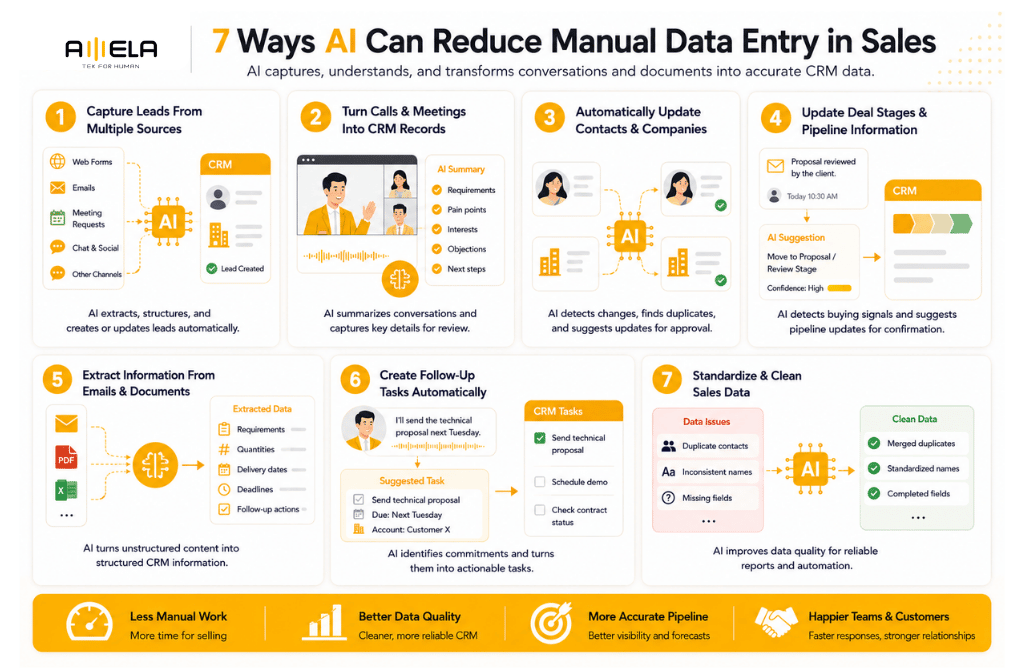
1. Automatically Capture Leads From Multiple Sources
AI can collect and structure lead information from forms, emails, meeting requests, and other sales channels without requiring repeated manual entry.
For example, when a prospect submits a website inquiry, an AI-enabled workflow can identify the company, contact details, requirements, and inquiry type before creating or updating the CRM record.
The same approach can work with incoming emails. Instead of asking a salesperson to copy the sender’s details and message into the CRM, the system can extract relevant information and associate it with the correct account.
The biggest value comes when leads arrive through several channels. AI can help consolidate these records and identify potential duplicates before they create another contact in the database.
2. Turn Sales Calls and Meetings Into CRM Records
Meeting and call information is one of the richest sources of sales data, but it is also one of the easiest for salespeople to leave undocumented.
AI can process transcripts and identify information such as:
- Customer requirements
- Pain points
- Product interests
- Objections
- Competitors mentioned
- Budget or timeline signals
- Agreed next steps
Instead of writing a long meeting summary from memory, the salesperson can review an AI-generated summary and confirm the important details.
This is particularly useful for B2B sales with multiple stakeholders. A structured record gives account managers, sales managers, and other team members a clearer view of what was actually discussed.
The important design choice is review rather than blind automation. AI can prepare the record, while the salesperson remains responsible for confirming commercially important information.
3. Automatically Update Contact and Company Information
AI can reduce the time spent maintaining basic account information by extracting new details and identifying records that may need updating.
Sales teams often encounter changes during ordinary conversations: a contact changes roles, a company opens a new office, a new decision-maker joins a project, or an existing customer introduces a new requirement.
Instead of relying on salespeople to remember every update, AI can flag relevant information from emails, meeting notes, or connected business systems.
It can also help identify duplicate contacts, inconsistent company names, and missing fields.
However, not every detected change should overwrite existing CRM data automatically. A better workflow is to assign confidence levels and require approval for sensitive or uncertain updates.
4. Update Deal Stages and Pipeline Information
AI can identify signals from sales interactions that suggest an opportunity’s CRM record may need updating.
For example, a prospect confirming a proposal review may indicate that a deal has progressed. A customer discussing implementation requirements may signal a stronger buying intention.
An AI system can detect these signals and suggest:
Detected: Proposal discussed
Suggested action: Move opportunity to proposal/review stage
Confidence: High
Action: Salesperson confirms
This approach is safer than allowing AI to change every pipeline field automatically. Deal value, probability, close date, and stage can affect forecasts and management decisions, so human approval may still be appropriate.
For sales managers, the benefit is not simply less data entry. More consistent updates can also make pipeline reviews more useful.
5. Extract Information From Emails and Documents
AI can turn unstructured sales emails and documents into structured information without requiring salespeople to manually read and re-enter every relevant detail.
B2B sales often involve lengthy email threads, quotations, specifications, proposals, purchase requirements, and contracts. Important information can easily remain buried in these documents.
AI can extract details such as:
- Product or service requirements
- Quantities
- Delivery dates
- Customer requests
- Proposal deadlines
- Contract dates
- Follow-up commitments
For example, a customer email saying that they need 200 licenses by October and want a revised quotation by Friday could automatically produce structured CRM information and a follow-up task.
This can be especially useful when sales teams handle large volumes of customer correspondence.
6. Create Follow-Up Tasks Automatically
AI can identify commitments made during sales interactions and turn them into actionable tasks.
A salesperson might say, “I’ll send the technical proposal next Tuesday,” during a meeting. Traditionally, they must remember the commitment and later create a CRM task themselves.
AI can recognize the commitment and suggest:
Task: Send technical proposal
Due date: Tuesday
Account: Customer X
The same principle can apply to scheduling demonstrations, requesting technical documents, checking contract status, or following up after a proposal.
This reduces the gap between what was agreed with the customer and what gets recorded internally.
The salesperson still owns the relationship, but AI handles the administrative step of turning an interaction into a reminder.
7. Standardize and Clean Sales Data
AI can help maintain CRM quality by detecting duplicates, inconsistent formats, missing information, and other recurring data problems.
Sales databases often become messy as different people enter information in different ways. One salesperson might enter “ABC Ltd,” another “ABC Limited,” while another creates a completely new record.
AI can identify potential duplicates and recommend standardization. It can also flag incomplete records before they affect reporting or lead routing.
This matters because automation depends on reliable underlying data. If the CRM contains duplicated accounts, missing fields, and inconsistent naming, adding more automated workflows will not necessarily improve the situation.
For that reason, data quality should be treated as part of AI implementation rather than an afterthought.
How AI Sales Data Entry Actually Works
A practical AI sales data-entry workflow connects existing sales information to the CRM through extraction, validation, and controlled automation.
The process typically follows six steps:
1. Capture: Collect information from emails, calls, meetings, forms, calendars, documents, and CRM activity.
2. Extract: AI identifies relevant entities and sales signals, such as contact names, requirements, dates, deal information, and next steps.
3. Validate: The system checks whether the information is complete, reliable, duplicated, or consistent with existing CRM records.
4. Update: Approved information is mapped to the correct CRM fields rather than simply added as free-form text.
5. Trigger: The updated information can activate workflows, such as assigning a lead, creating a follow-up task, or notifying an account manager.
6. Review: Low-confidence or commercially sensitive changes are sent to a salesperson for approval.
This architecture is important because AI should not have unrestricted access to modify every CRM field. A controlled workflow makes it easier to balance automation with data accuracy and business accountability.
What AI Should Not Automate Completely
AI is useful for preparing and organizing sales information, but decisions requiring commercial judgment should generally remain under human control.
For example, businesses should be cautious about fully automating:
- Major deal-value changes
- Contract terms
- Pricing commitments
- Strategic account qualification
- Forecast changes
- Sensitive customer communications
- Final purchasing or negotiation decisions
A better approach is human-in-the-loop automation. AI can detect a signal and recommend an action, while the salesperson approves changes that could affect revenue, customer relationships, or contractual obligations.
This also creates a useful confidence-based model. Low-risk, high-confidence actions can happen automatically, while uncertain or high-impact actions require approval.
How to Implement AI Data Entry Without Disrupting Sales
The safest approach is to automate one repetitive workflow first, measure its results, and expand only after the process proves reliable.
1. Audit the Current Workflow
Identify where salespeople repeatedly copy information between systems. Look at CRM updates, meeting notes, lead creation, email logging, and follow-up tasks.
2. Start With One High-Volume Task
Do not automate the entire sales operation at once. Meeting-to-CRM summaries or lead capture are often easier starting points because the input and desired output are relatively clear.
3. Connect the Existing Systems
Map how information moves between the CRM, email, calendar, communication tools, forms, and other sales platforms. The goal is to remove unnecessary manual transfers rather than create another isolated AI tool.
4. Define Data and Approval Rules
Specify required fields, formatting, duplicate handling, confidence thresholds, and which updates require human approval.
5. Run AI Alongside the Existing Process
During the pilot, compare AI-generated records with manually created records. This helps identify extraction errors before the automation becomes business-critical.
6. Measure the Results
Useful metrics include:
- Time spent on manual CRM entry
- CRM record completeness
- Data-error rate
- Duplicate records
- Lead response time
- Follow-up completion
- Salesperson adoption
The objective is not simply to generate more automated records. The objective is to create more reliable sales information with less administrative effort.
FAQs
Can AI completely replace manual sales data entry?
AI can automate a large portion of repetitive data entry, but complete replacement is rarely the best approach. Salespeople should still review information that affects pricing, deal stages, forecasts, contracts, or customer relationships.
How does AI update CRM records automatically?
AI extracts relevant information from sources such as emails, calls, meetings, forms, and documents. It then maps the information to CRM fields and can update records or request human approval depending on the confidence level and business rules.
Is AI sales data entry accurate?
Accuracy depends on the quality of the source data, AI model, integration, and validation rules. For important CRM fields, a human-review step can prevent incorrect information from being automatically recorded.
Can AI work with an existing CRM?
Yes. AI can be connected to an existing CRM through APIs, automation platforms, or custom integrations. The right approach depends on the CRM’s capabilities and how much customization the sales process requires.
How should a sales team start automating data entry?
Start with one repetitive, high-volume task such as converting meeting notes into CRM records or automatically capturing inbound leads. Measure accuracy and time savings before expanding automation to other workflows.
Does every company need custom AI development?
No. Standard CRM automation can handle straightforward workflows such as form submissions, lead routing, and basic record updates. Custom AI development becomes more valuable when a company has complex business rules, multiple internal systems, proprietary data, or workflows that standard tools cannot support.
Use AI to Remove Data Work, Not Sales Judgment
AI can reduce manual data entry in sales by turning information already generated during customer interactions into structured, usable CRM data.
The biggest opportunity is not simply automating typing. It is connecting emails, meetings, calls, documents, CRM records, and follow-up actions so information moves through the sales process with less manual intervention.
The best starting point is usually a repetitive, high-volume, low-risk task. From there, teams can introduce validation, human approval, and additional workflows as confidence grows.
For companies with complex CRM environments or unique sales processes, off-the-shelf automation may eventually become limiting. In those cases, custom AI development can connect existing systems and build workflows around the company’s actual processes rather than forcing the team into a generic automation model.
AMELA Technology provides AI development services for businesses looking to build and integrate AI into existing workflows.