 Jul 15, 2026
Table of Contents
A B2B SaaS backend becomes enterprise-ready when it can serve multiple organizations securely, integrate with customer systems, and support stricter identity, governance, and reliability requirements without creating a custom product for every account.
Many SaaS products reach their first customers with a straightforward architecture: one application, basic user roles, several third-party APIs, and manual onboarding. That is often the correct way to validate the product.
Problems appear when larger customers begin asking for organization-level permissions, enterprise SSO, audit logs, bulk data migration, webhooks, usage limits, or guaranteed recovery processes. Adding each request as a one-off exception creates duplicated logic and makes future releases harder to test.
This guide presents 15 high-impact backend development ideas for B2B SaaS companies. The goal is not to build every capability immediately, but to identify which platform investments will remove sales blockers, reduce operational work, and support repeatable growth.
What Makes a B2B SaaS Backend Enterprise-Ready?
An enterprise-ready backend turns customer-specific requirements into reusable platform capabilities. It provides secure tenant boundaries, configurable access, reliable integrations, traceable activity, and predictable operations at scale.
In practice, enterprise readiness usually depends on six areas:
| Capability | What the customer expects |
| Tenant management | Each organization has separate users, data, settings, and lifecycle controls |
| Identity and access | SSO, controlled provisioning, and permissions that match company roles |
| Governance | Audit logs, retention policies, security controls, and administrative oversight |
| Integrations | Stable APIs, reliable webhooks, bulk data exchange, and clear failure handling |
| Commercial control | Plans, entitlements, quotas, usage tracking, and contract-specific features |
| Operations | Tenant-aware monitoring, performance isolation, backups, and recovery processes |
The first architectural test is whether tenant context is treated as a core part of the system. Every request, background job, database operation, event, and log should identify which customer organization it belongs to.
AWS describes tenant isolation as a foundational SaaS requirement: even when customers share infrastructure, the architecture must prevent one tenant from accessing another tenant’s resources. Microsoft similarly recommends choosing an isolation model by balancing security, performance, cost, scale, and operational complexity.
Enterprise-ready also does not automatically mean microservices. For many growing SaaS companies, a modular monolith is easier to test, deploy, and operate. The priority is to establish clear boundaries around identity, tenants, permissions, billing, integrations, and events. Services can be separated later when scale or team ownership creates a real need.
The programming language or framework should support those boundaries without creating unnecessary operational complexity. When evaluating a backend framework for web development, consider the team’s expertise, security ecosystem, integration support, testing tools, and long-term maintainability—not popularity alone.
The practical goal is repeatability. When the fifth enterprise customer requests SSO, audit exports, or custom limits, the engineering team should configure an existing capability rather than build another customer-specific branch.
15 Backend Development Ideas for B2B SaaS Companies
These four foundations help B2B SaaS companies support more customers without creating cross-tenant risks or customer-specific code.
1. Make the Tenant a First-Class Domain Object
Model the organization, workspace, or tenant as a core entity—not just a group of users.
Each tenant should have its own users, memberships, settings, subscription, integrations, data, and lifecycle status. Tenant context should also follow every request, background job, event, cache key, file, and log.
Do not trust a tenant ID sent directly from the frontend. The backend should derive the active tenant from the authenticated user’s membership and verify access again when loading each resource.
This becomes especially important when one user belongs to multiple organizations with different roles.
2. Choose a Clear Tenant Isolation Model
Select an isolation model based on security, scale, performance, and operating cost.
| Model | Best fit |
| Shared tables | Many smaller tenants |
| Separate schemas | Moderate isolation needs |
| Separate databases | Regulated or high-value accounts |
| Hybrid model | Shared platform with dedicated enterprise tiers |
A hybrid model often works well: most customers share infrastructure, while selected enterprise clients receive dedicated databases or environments.
Isolation must cover more than the main database. Review caches, file storage, queues, search indexes, logs, analytics systems, and backups as well.
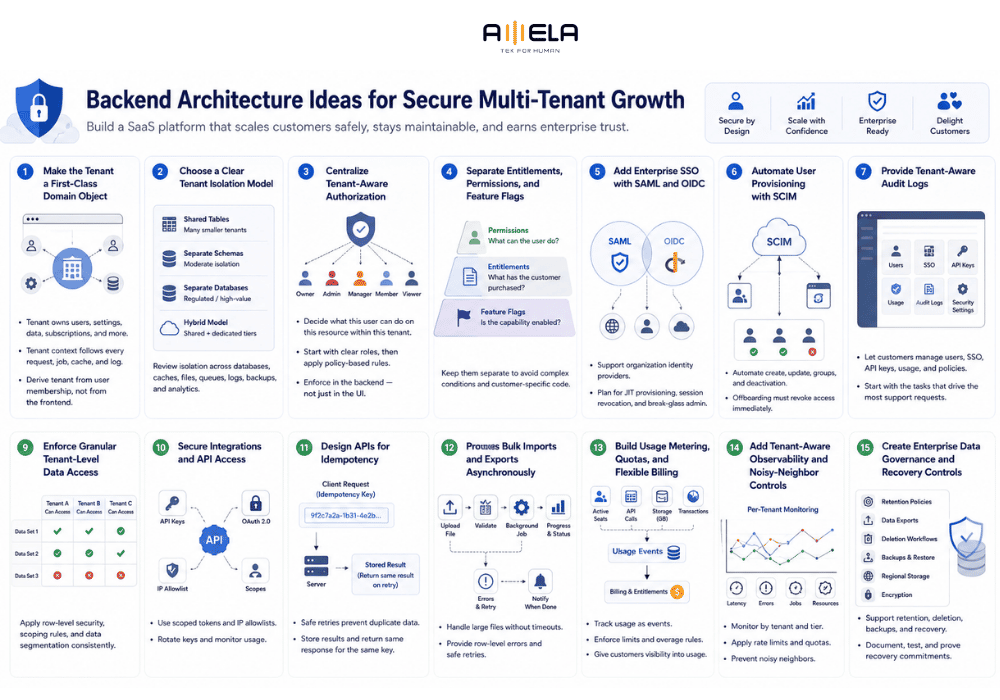
3. Centralize Tenant-Aware Authorization
Authentication confirms the user’s identity. Authorization decides what that user can do inside a specific tenant.
Avoid spreading checks such as is_admin across controllers and frontend components. Instead, centralize policies around:
Can this user perform this action on this resource within this tenant?
Start with roles such as owner, admin, manager, member, and viewer. Add policy-based rules when access depends on resource ownership, department, location, or data sensitivity.
Always enforce permissions in the backend. Hiding a button in the interface does not secure the underlying API.
4. Separate Entitlements, Permissions, and Feature Flags
These controls solve different problems:
- Permissions: What can this user do?
- Entitlements: What has this customer purchased?
- Feature flags: Is the capability currently enabled?
Mixing them creates difficult-to-maintain conditions and customer-specific exceptions.
Create a central entitlement layer that evaluates subscription plans, add-ons, usage limits, trial status, and contract dates. Use feature flags only for gradual releases, testing, and temporary controls.
This allows enterprise customers to receive different plans and limits while the engineering team maintains one product instead of separate code branches for individual accounts.
5. Add Enterprise SSO With SAML and OIDC
Enterprise SSO lets employees access the SaaS product through their company identity provider rather than managing another password.
Support SAML for traditional enterprise environments and OpenID Connect for modern identity platforms. OpenID Connect adds an identity layer on top of OAuth 2.0, while SAML remains widely used for identity federation and web SSO.
Plan for:
- Organization-specific identity providers
- Domain-based login discovery
- Just-in-time user creation
- Session revocation
- Emergency administrator access
Do not build SSO only as a login-screen feature. It must connect to tenant membership, user status, and authorization rules.
6. Automate User Provisioning With SCIM
SSO authenticates users; SCIM helps customer IT teams create, update, group, and deactivate them automatically.
SCIM is an HTTP-based standard for managing identity data across systems.
A reliable implementation should handle:
- Repeated provisioning requests
- Group-to-role mapping
- User deactivation
- Email or identifier changes
- Session and API-token revocation
The most important workflow is offboarding. When an employee is removed from the customer’s directory, access to the SaaS product should be revoked without waiting for a support ticket.
7. Provide Tenant-Aware Audit Logs
Audit logs help customer administrators answer who changed what, when, and from where.
Useful events include:
- Login and SSO changes
- User invitations and removals
- Role and permission updates
- Data exports or deletions
- API key creation
- Integration and security changes
Audit logs should be immutable, easy for non-developers to understand, and scoped to the correct tenant. OWASP recommends including tenant context in logs and maintaining tenant-isolated audit trails in multi-tenant applications.
Growing SaaS companies should also establish practical IT security foundations before enterprise security reviews force rushed changes.
8. Build a Customer Administration Portal
Enterprise customers should not depend on the SaaS support team for routine account administration.
A customer admin portal can allow authorized users to:
- Invite or remove members
- Assign roles
- Configure SSO
- Manage API credentials
- Review usage
- Access audit events
- Control selected security policies
Start with the tasks that generate the most support requests. A complete administration console is unnecessary if customers mainly need user management and SSO configuration.
The objective is controlled self-service: customers gain operational independence without receiving access to internal support or platform-administration tools.
It is valuable for:
- Payments
- User provisioning
- Bulk imports
- Subscription changes
- Record creation
- Integration commands
For example, if a customer’s request times out after creating 1,000 users, repeating it should not create another 1,000 accounts.
Accept an idempotency key, store the result of the first completed request, and return the same result when that key is retried. Stripe uses this approach to make retried API operations safer after connection failures.
Database uniqueness rules and operation-status tracking should still provide additional protection.
9. Build a Versioned Public API
A public API turns integrations into a repeatable product capability rather than a series of customer-specific scripts.
Design it around stable business resources, not internal database tables. Include:
- Tenant-scoped credentials
- Consistent errors
- Pagination and filtering
- Rate limits
- Clear API documentation
- A sandbox or test environment
Plan versioning and deprecation before external customers depend on the API. Google’s API guidance recommends allowing old and new versions to operate during a communicated transition period rather than removing an existing version abruptly.
Treat the API as a long-term contract. Internal models can change quickly; customer integrations usually cannot.
10. Offer Reliable Custom Webhooks
Webhooks let customers receive product events without repeatedly polling the API.
Allow each tenant to select events such as:
- User created
- Record updated
- Workflow completed
- Subscription changed
- Export ready
A production-ready webhook system needs signed payloads, delivery history, retries, failure alerts, and manual replay. Handlers must also tolerate duplicate events. Stripe, for example, automatically retries failed webhook deliveries and provides tools for resending events.
Include an event ID so customers can detect duplicates. A repeated customer.updated event should not create a second CRM record or repeat another irreversible action.
11. Make Important Operations Idempotent
Idempotency allows a request to be retried without performing the same operation twice.
It is valuable for:
- Payments
- User provisioning
- Bulk imports
- Subscription changes
- Record creation
- Integration commands
For example, if a customer’s request times out after creating 1,000 users, repeating it should not create another 1,000 accounts.
Accept an idempotency key, store the result of the first completed request, and return the same result when that key is retried. Stripe uses this approach to make retried API operations safer after connection failures.
Database uniqueness rules and operation-status tracking should still provide additional protection.
12. Process Bulk Imports and Exports Asynchronously
Enterprise onboarding often involves thousands of users, products, records, or historical transactions. Processing these files inside one web request leads to timeouts and poor failure visibility.
Use a job-based workflow:
- Upload the file.
- Validate its structure.
- Create a background job.
- Show progress and status.
- Provide row-level errors.
- Allow safe retries.
- Notify the user when processing finishes.
Salesforce’s bulk APIs use asynchronous processing for large datasets rather than treating every record as a separate real-time request.
Avoid an all-or-nothing result where one invalid row causes a 50,000-record import to fail. Let customers download an error report, correct failed records, and retry only what remains.
13. Build Usage Metering, Quotas, and Flexible Billing
Track product usage as structured events, such as:
- Active seats
- API calls
- Storage consumed
- Transactions processed
- Workflows completed
Store raw usage events separately from billing calculations. This lets the company change pricing rules without losing the original usage history.
The entitlement layer should also enforce plan limits and overage rules before the billing system generates an invoice. Customers should be able to view their current usage so unexpected charges do not become support issues.
Modern billing platforms support event-based metering, flexible pricing models, and automated invoice generation, but the SaaS backend still needs reliable usage collection and reconciliation.
14. Add Tenant-Aware Observability and Noisy-Neighbor Controls
Global averages can hide customer-specific problems. Monitor latency, errors, job failures, resource consumption, and API usage by tenant and subscription tier.
This allows the engineering team to answer questions such as:
- Is one tenant causing most database load?
- Are enterprise customers receiving the expected performance?
- Is a failed integration isolated to one account?
- Which customers are approaching usage limits?
Apply rate limits, quotas, workload isolation, and background-job controls where necessary. The noisy-neighbor problem occurs when one tenant’s activity reduces performance for others sharing the same infrastructure.
For example, a 500,000-record import from one customer should not cause timeouts for every other tenant.
15. Create Enterprise Data Governance and Recovery Controls
Enterprise customers may ask how data is stored, retained, exported, deleted, backed up, and restored.
The backend should support:
- Configurable retention periods
- Customer data exports
- Account and tenant deletion workflows
- Backup and restore testing
- Defined recovery objectives
- Regional data storage where required
- Tenant-specific encryption when justified
Do not treat deletion as one database command. Customer information may also exist in files, search indexes, caches, analytics systems, queues, logs, backups, and third-party services.
Document which systems are deleted immediately, which follow retention schedules, and which records must remain for legal or financial purposes. Privacy requirements such as the GDPR may give individuals the right to request erasure under defined conditions.
Recovery promises should also be tested. A backup is not useful until the team has confirmed that it can restore the correct data within the time committed to customers.
Which Backend Ideas Should You Build First?
Prioritize backend work by customer risk, repeated sales demand, and operational pain—not by what appears on a generic enterprise feature checklist.
Foundation Stage
Before adding enterprise features, establish:
- A first-class tenant model
- Clear tenant isolation
- Centralized authorization
- Plan entitlements and usage limits
- Background job processing
- Tenant-aware logs and monitoring
These capabilities are difficult to retrofit because later features depend on them. SSO, billing, webhooks, and audit logs all become harder to implement when tenant context and permissions are inconsistent.
Moving Into the Mid-Market
Add capabilities that reduce manual work and make integrations repeatable:
- Public APIs
- Reliable webhooks
- Bulk import and export
- Customer administration
- Stronger audit logs
- Usage metering
For example, if implementation teams repeatedly write scripts to import customer data, a reusable asynchronous import system may deliver more immediate value than an advanced identity feature.
Preparing for Enterprise Sales
Prioritize requirements that appear across active deals:
- SAML or OIDC SSO
- SCIM provisioning
- Detailed audit logs
- Data retention controls
- Recovery commitments
- Regional data storage
- Dedicated infrastructure options
A practical scoring model is:
| Factor | Question |
| Revenue impact | Is this blocking or supporting active deals? |
| Customer frequency | How many customers have requested it? |
| Risk reduction | Does it address security, reliability, or compliance risk? |
| Operational impact | Will it reduce recurring support or engineering work? |
| Architecture dependency | Do other planned features depend on it? |
| Delivery effort | Can the team build and maintain it reliably? |
Do not build SSO or SCIM solely to appear enterprise-ready. A feature requested by one unusual prospect may not justify months of engineering. Repeated demand from the target segment is a stronger signal.
Companies lacking enough internal capacity can consider outsourcing SaaS development for well-defined modules, architecture modernization, or a dedicated engineering team. Core product ownership and architectural decisions should still remain clear internally.
Common Backend Development Mistakes in B2B SaaS
The most expensive backend mistakes usually come from adding enterprise requirements as exceptions rather than designing reusable platform capabilities.
- Treating Tenant Isolation as a Query Convention
Adding WHERE tenant_id = … to most queries is not a complete security model. Tenant boundaries must also cover files, jobs, caches, search, analytics, logs, and administrative tools.
- Creating Customer-Specific Business Logic
Conditions tied to individual customer names quickly become difficult to test and remove. Use entitlements, configuration, and policy rules instead of maintaining separate product behavior in code.
- Mixing Permissions, Plans, and Feature Flags
A user role, a purchased feature, and a temporary rollout flag represent different decisions. Combining them produces confusing access bugs and makes contract changes risky.
- Building Webhooks Without Operational Tools
Webhooks need retries, signing, delivery records, duplicate protection, and replay. Without these controls, support teams cannot explain why an integration missed an event.
- Moving to Microservices Too Early
Microservices add deployment, monitoring, networking, and data-consistency complexity. A modular monolith is often a better choice until scale, independent deployment, or team ownership creates a clear reason to separate services.
- Monitoring the Platform but Not Individual Tenants
A healthy platform-wide average can hide one enterprise customer experiencing repeated failures. Track important errors, latency, workloads, and integration status by tenant.
- Promising Enterprise Features Without Operating Them
Dedicated databases, regional hosting, recovery targets, and custom retention policies create ongoing responsibilities. Before selling them, confirm that provisioning, monitoring, support, and incident response are repeatable.
FAQs
What Backend Features Are Essential for a B2B SaaS MVP?
Start with tenant management, secure authentication, centralized authorization, background jobs, entitlements, basic usage tracking, and tenant-aware monitoring. Enterprise SSO, SCIM, and advanced audit logs can usually wait until the target market requires them.
When Should a SaaS Product Introduce Multi-Tenancy?
Design tenant boundaries before serving multiple customer organizations. Retrofitting multi-tenancy after data, permissions, jobs, and integrations have grown is significantly more difficult and creates a higher risk of cross-tenant access.
When Should a B2B SaaS Company Add Enterprise SSO?
Prioritize SSO when it repeatedly appears in active enterprise deals or security reviews. One unusual request may not justify the investment, but recurring demand from the target segment is a strong roadmap signal.
What Is the Difference Between SSO and SCIM?
SSO authenticates users through the customer’s identity provider. SCIM automates user creation, role or group updates, and deactivation. Enterprise customers often need both to manage access throughout the employee lifecycle.
Should a SaaS Backend Use Microservices?
Not necessarily. A modular monolith is often easier to develop and operate during early growth. Move to microservices when independent deployment, scaling requirements, domain boundaries, or team ownership create a clear operational benefit.
How Should SaaS Webhooks Handle Failed Deliveries?
Use signed payloads, retries with backoff, delivery logs, duplicate-event protection, and manual replay. Customers should be able to investigate failed events without relying entirely on the SaaS support team.
Build Reusable Backend Capabilities, Not Customer-Specific Patches
The most valuable backend development ideas for B2B SaaS companies turn repeated customer requirements into scalable platform capabilities.
Start with tenant context, isolation, authorization, entitlements, and observability. These foundations support almost every later feature, from usage billing and public APIs to SSO and audit logs.
As the company moves upmarket, prioritize backend investments based on repeated customer demand, revenue impact, operational effort, and security risk. Avoid building every enterprise feature in advance, but do not wait until a signed contract forces rushed architectural changes.
AMELA Technology supports SaaS companies with backend development, platform modernization, cloud engineering, integrations, and dedicated development teams. The objective is not to add more features—it is to build a backend that can support more customers without multiplying technical complexity.