 Sep 20, 2026
Table of Contents
Digital infrastructure complexity shouldn’t exhaust an IT budget. For small and medium-sized businesses (SMBs), maintaining application uptime, managing cloud dependencies, and resolving unexpected system crashes manually has become an expensive operational bottleneck. Implementing AIOps for SMBs (Artificial Intelligence for IT Operations) transforms technical management from a continuous cycle of firefighting into a highly automated, predictable engineering environment.
Key Takeaways
- Proactive Shift: AIOps shifts technical operations from traditional, reactive log alerts to predictive machine learning systems that isolate infrastructure risks before they cause user downtime.
- Alert Fatigue Elimination: Automated event correlation compresses thousands of separate server notifications into a single, actionable root-cause report, saving hours of manual diagnostic tracking.
- Operational Health Check: By combining automated AI agents with professional external oversight, mid-market enterprises can establish true 24/7/365 system visibility without local headcount friction.
What Is AIOps for SMBs?
AIOps for SMBs refers to the deployment of machine learning algorithms and big data analytics to automate infrastructure monitoring, correlate disconnected network events, and resolve system anomalies across software ecosystems without expanding full-time internal engineering headcounts.
Shifting from Reactive Logs to Intelligent Automation
Modern business systems generate more data telemetry than a lean internal engineering team can manually process. Traditional application monitoring relies on static, rule-based thresholds—such as triggering an alert when CPU usage passes 85%. This model forces engineers to constantly react after a performance drop has already impacted live software workflows.
AIOps systems break this cycle by establishing a continuous performance baseline across your cloud infrastructure. Instead of waiting for a threshold breach, the system identifies mathematical anomalies—such as an unusual mix of minor database read delays and memory increases—allowing technical teams to patch underlying infrastructure vulnerabilities hours before a critical service crash occurs.
What Are the Main Benefits of AI IT Operations?
Deploying artificial intelligence within your technical ecosystem reduces operational overhead, eliminates human diagnostic delays, and protects customer experiences by maintaining near-continuous application availability.
Minimizing Alert Fatigue Through Root-Cause Analysis
Automated event correlation solves the problem of alert fatigue by grouping thousands of isolated system warnings into a single root-cause explanation. When a core database slows down, it typically triggers a cascade of secondary failures: API timeouts, microservice connection errors, and frontend interface errors. In a traditional monitoring setup, this results in an “alert storm” that floods engineers with hundreds of redundant notifications.
An AIOps engine acts as an analytical filter. By tracking structural relationships across your entire tech stack, the system groups those concurrent warnings together, dismisses the secondary symptoms, and presents your engineers with the single source of failure. This structural clarity saves operations teams from wasting hours hunting through disparate logs during an outage.
Accelerating System Recovery Times From Hours to Minutes
By integrating predictive pattern recognition with automated step-by-step resolution scripts, teams can lower their Mean Time to Resolution (MTTR) by over 60%. When a production incident occurs, the longest phase of recovery is usually identification—discovering exactly where the system broke.
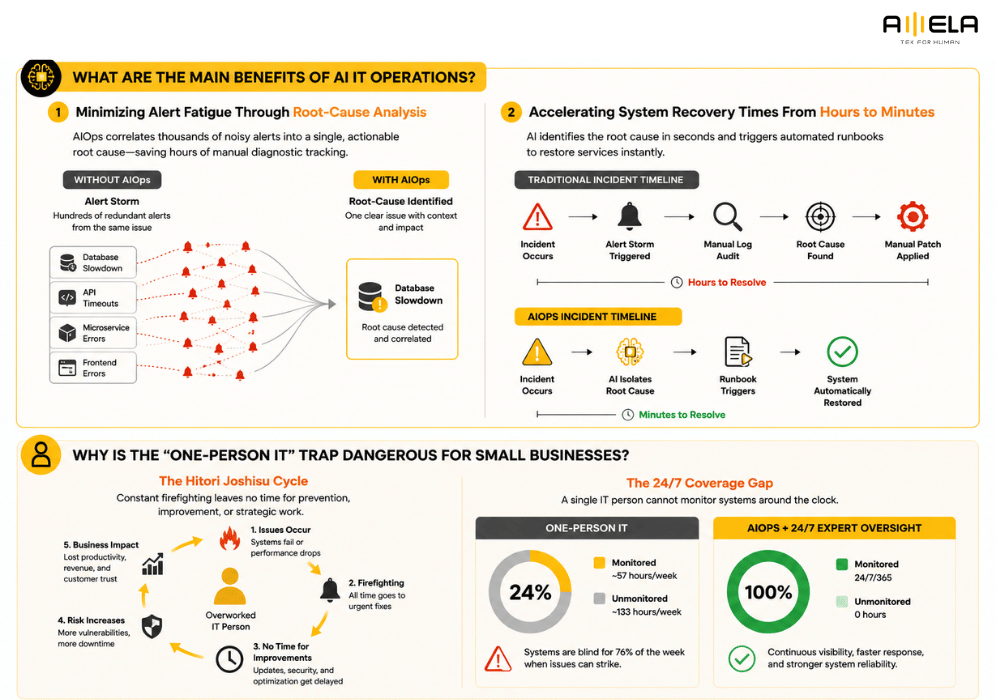
AIOps matches incoming behavioral telemetry against deep historical failure models to identify the breakdown source within seconds. Once verified, the software can trigger pre-approved infrastructure runbooks—automated scripts that safely clear log caches, scale container clusters, or restart isolated services—restoring system health instantly without needing a manual human fix.
Why Is the “One-Person IT” Trap Dangerous for Small Businesses?
Relying on a single internal technician to manage your entire network infrastructure creates a dangerous single point of failure, leading to severe operational burnout and leaving systems unmonitored for up to 76% of the week.
The Hidden Operational Risks of the Hitori Joshisu Cycle
The “Hitori Joshisu” (one-person IT department) pattern creates an unstable operational environment where technical staff spend all their energy handling emergencies rather than building long-term business value. When a single employee is responsible for every server configuration, software update, and employee helpdesk ticket, they quickly become overwhelmed by continuous technical friction. This baseline creates a destructive cycle: because they are constantly “firefighting” active infrastructure issues, they lack the time to implement protective security patches or optimize system architectures. Over time, this extreme operational pressure causes critical talent burnout, leading to sudden employee departures that leave the business with zero institutional technical support. To understand how to break this cycle using external delivery models, companies frequently evaluate the structural leverage of outsourced IT for small businesses.
Managing the 76% Weekend and Night System Blind Spot
Because standard office hours only cover roughly 24% of a weekly calendar, leaving infrastructure without automated oversight during nights and weekends exposes businesses to severe downtime risks. A solo engineer must sleep, take weekends off, and take personal leave, creating a massive coverage gap. For example, if a primary e-commerce database or cloud application crashes at 2:00 AM on a Sunday, a manual IT setup will not detect the incident until the engineer logs on at 8:00 AM on Monday morning. This 30-hour delay results in prolonged data synchronization failures, broken user experiences, and substantial drops in transactional revenue—all of which could have been isolated instantly by automated monitoring layers.
How Can SMBs Evaluate Different IT Operations Models?
Choosing the right IT operations model requires balancing monthly expenditure, internal management capacity, and the technical necessity for continuous, 24/7/365 infrastructure visibility.
Key Selection Criteria for Growing Technical Teams
Selecting how to manage your systems infrastructure depends on how much operational complexity your internal team can handle without slowing down your primary core software development initiatives. Small and mid-sized organizations generally choose between three core operational pathways: purchasing standalone automation software, investing in a native, multi-shift technical team, or deploying a collaborative external model.
The table below outlines the core practical trade-offs of each approach:
| IT Operations Model | Monthly Budget Impact | Onboarding Speed | True 24/7/365 Coverage | Internal Management Overhead |
| Off-the-Shelf Commercial Tools | Medium | Fast (1–2 weeks) | No (Triggers automated alerts but still requires a human engineer to wake up and fix the code) | High (Your internal engineers must learn, configure, and maintain the platform metrics) |
| In-House 24/7 SRE Team | Extremely High | Very Slow (3–6 months to recruit multiple shifts) | Yes (Full human coverage across night and weekend rotations) | Extremely High (Requires dedicated HR pipelines, shift management, and continuous technical training) |
| Hybrid Managed IT Operations | Low to Medium | Balanced (4–8 weeks) | Yes (Continuous multi-agent AI detection backed by remote human engineering teams) | Low (The external delivery partner handles daily operational logistics and shift rotations) |
What Are the Security Best Practices for Deploying AI IT Tools?
Securing AI IT operations requires implementing strict graduated autonomy frameworks, enforcing read-only data access principles, and continuously isolating monitoring tools to prevent unauthorized changes to core application environments.
What Are the Security Best Practices for Deploying AI IT Tools?
Securing AI IT tools requires implementing graduated autonomy, restricting environments to read-only data access, and maintaining strict human-in-the-loop validation gates to prevent unauthorized infrastructure changes.
Mitigating Risks with Graduated Autonomy Frameworks
Graduated autonomy protects live production environments by aligning automated execution rights with the specific risk profile of each technical task. Moving too quickly into full automation exposes an organization to unpredictable system configurations. Data from the Stanford HAI AI Index Report emphasizes that establishing clear operational guardrails and safety boundaries is essential as commercial AI deployments scale. By implementing a tiered system, engineering teams can safely limit autonomous scripts to routine, low-risk tasks while keeping manual controls over sensitive systems.
- Level 1 (Notify): The system acts as a passive observer, monitoring telemetry and alerting human technicians to anomalies without making changes.
- Level 2 (Suggest): The software identifies a root-cause issue and generates a resolution script, but pauses until an engineer manually reviews and approves it.
- Level 3 (Act + Approve): The system prepares the fix, initiates low-risk prerequisite setup steps, and halts at a final checkpoint waiting for human confirmation.
- Level 4 (Autonomous): The system independently resolves routine, highly repetitive incidents—such as clearing full temporary logs or restarting a locked service—based on pre-set manuals.
Ensuring Data Privacy with Read-Only Architecture Controls
Enforcing read-only architecture controls ensures that automated AI monitoring tools can analyze telemetry streams without gaining authorization to modify backend databases. Granting third-party automation tools broad write privileges creates massive data privacy and security vulnerabilities. To keep systems isolated, configuration pipelines should be restricted to ingest performance metadata only. The GitHub Octoverse Report notes a significant rise in developers using automated infrastructure assistants, but highlights that the most secure setups decouple telemetry collection from data modification layers. This approach protects sensitive customer data even if the monitoring platform experiences an external security event.
How Does AMELA × CloudThinker Solve the SMB IT Gap?
Amela × CloudThinker fills the mid-market operational gap by blending an automated multi-agent AI platform with a managed, 24/7 human engineering team to resolve system incidents rapidly and affordably.
Blending 135+ Multi-Agent AI Specialists with Human Verification
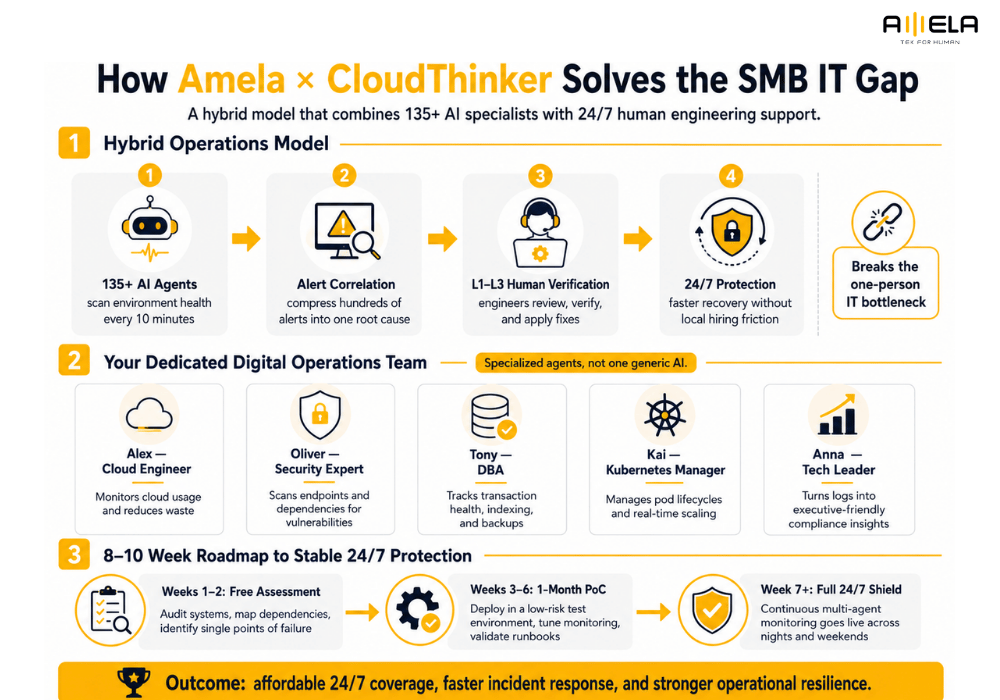
Combining automated machine learning diagnostics with certified human engineers ensures that routine infrastructure tasks are handled instantly while complex incidents receive expert technical oversight. This hybrid model directly breaks the “one-person IT” bottleneck. Rather than leaving a single employee to monitor systems alone, our framework deploys over 135 automated agents to scan environment health every 10 minutes, compressing hundreds of minor alerts into a single root cause.
Once the system isolates a complex problem, real Level 1 to Level 3 (L1 to L3) engineers from our team step in to verify the findings and implement the necessary custom code fixes. This integration allows growing brands to scale their infrastructure smoothly through our structured managed IT services without the friction of local hiring.
Your Dedicated Digital Operations Team: Alex, Oliver, Tony, Kai, and Anna
A multi-agent AI framework deploys specialized, task-focused software personalities rather than relying on a single, generic artificial intelligence model. Each agent operates within a strict boundary, focusing exclusively on its area of technical expertise:
- Alex (Cloud Engineer): Continuously monitors resource utilization across your cloud infrastructure, finding unassigned storage volumes and idle compute instances to reduce waste.
- Oliver (Security Expert): Functions as a digital safeguard, scanning public-facing endpoints and internal dependency trees for open technical vulnerabilities.
- Tony (DBA / Database Administrator): Monitors transaction delays, optimizes indexing paths, and confirms backup restoration health to keep your data layer stable.
- Kai (K8s / Kubernetes Manager): Tracks software container cluster orchestration, managing pod lifecycles and ensuring systems scale up or down based on real-time user traffic.
- Anna (Tech Leader): Extracts complex operational logs and translates them into high-level, easy-to-read compliance summaries for company executives.
An 8-to-10 Week Roadmap to Stable 24/7 Protection
A structured onboarding timeline minimizes operational friction by thoroughly assessing current systems and validating workflows through a low-risk trial phase before final activation. Transitioning away from a manual setup is treated as an objective, milestone-based engineering process:
Step 1: Free Assessment (Systems Audit) ──► Step 2: 1-Month PoC (Isolated Testing) ──► Step 3: Full 24/7 Shield (Active Protection)
- System Assessment (Weeks 1–2): Our delivery team runs a comprehensive audit of your current applications, mapping out system dependencies and identifying single points of failure.
- Proof of Concept (PoC) Validation (Weeks 3–6): The system is deployed to an isolated, low-risk testing environment for one month to tune monitoring filters and verify automated instruction scripts.
- Full 24/7 Protection (Week 7+): Continuous multi-agent monitoring goes live, providing complete infrastructure coverage across nights and weekends for less than the cost of a single local technical hire.
What Are the Core Risks of AIOps and How Do You Manage Them?
Adopting AIOps introduces specific operational risks like over-reliance on automated scripts and misconfigured data telemetry, which businesses can manage through human-in-the-loop validation and controlled architectural staging.
Over-Reliance on Automation Without Human Oversight
Complete dependence on automated code execution without manual checkpoints can turn simple system anomalies into widespread operational outages. While automated workflows handle routine infrastructure updates well, giving a software engine unmonitored permission to alter critical resources presents clear hazards. Data from the Stack Overflow 2025 Developer Survey highlights that 66% of software professionals experience frustration with automated solutions that are “almost right, but not quite,” noting that debugging AI-generated adjustments can become highly time-consuming.
To manage this vulnerability, technical teams must deploy strict confirmation gates. Destructive system actions—such as dropping production database tables, modifying core network security groups, or tearing down cloud storage instances—should always pause for explicit manual review by an experienced human administrator before execution.
Algorithmic Gaps and Infrastructure Misconfigurations
Deploying automated operations tools onto poorly structured systems will amplify existing engineering flaws rather than resolve them. AI models rely completely on the quality of the data telemetry they ingest. If your underlying microservices have bad logging configurations or inconsistent error handling, the machine learning system will generate false positives, leading to alert fatigue for your engineering team.
Before moving to automated infrastructure operations, companies must evaluate how machine learning impacts their broader technical ecosystem. Evaluating the advantages and disadvantages impact of AI on software development helps engineering leads balance rapid AI automation with clean, human-reviewed code quality to prevent long-term technical debt.
Frequently Asked Questions About SMB AIOps
Does my company collect enough data to make AI monitoring useful?
Yes. Unlike older enterprise platforms that required months of historical data to train custom models, modern multi-agent monitoring systems use pre-trained behavioral models. These tools can analyze standard infrastructure metrics—such as CPU utilization, memory usage, and database transaction times—and identify anomalies immediately after deployment.
Will implementing an automated IT tool threaten our existing IT staff?
No, it acts as an operational support tool rather than a replacement. By automating repetitive 24/7 log monitoring and alert filtering, the system frees your internal engineers from constant midnight firefighting. This allows your team to focus on high-value projects like optimizing system architecture, modernizing legacy code, and delivering new business features.
Can these multi-agent systems integrate with older, legacy servers?
Yes. Modern monitoring systems connect to older infrastructure using lightweight data collection agents. These agents securely capture server logs and network telemetry, forwarding the information to a centralized AI platform for analysis without requiring you to rewrite your underlying legacy code.
Conclusion
Implementing AIOps for SMBs is no longer an experimental strategy reserved for enterprise budgets; it has become a necessary operational framework for growing companies looking to secure their applications and optimize engineering efficiency. Relying entirely on manual oversight or a solo internal engineer creates a dangerous single point of failure that leaves your systems unmonitored for a significant portion of every week.
By utilizing a hybrid operational framework—such as combining automated multi-agent platforms with remote human validation—small and medium-sized organizations can eliminate alert fatigue, lower their recovery times, and maintain 24/7/365 infrastructure stability. Transitioning to an intelligent, proactive operations model protects your digital assets, preserves your team’s energy, and keeps your technical resources focused on driving long-term business growth.