 Jul 13, 2026
Table of Contents
A B2B website redesign should improve how buyers understand, trust, and engage with your business—not simply make the site look newer.
For marketers, the website must attract qualified traffic and convert it into measurable opportunities. For sales teams, it should explain the offer, address common objections, and provide proof that supports ongoing conversations. Founders need the redesign to reflect the company’s current direction without creating unnecessary cost, disruption, or technical debt.
That is why redesign projects often fail when they begin with colors, page layouts, or technology choices. The team first needs to agree on the business problem, target buyers, messaging, priority journeys, and expected results.
This B2B website redesign guide explains how to decide what level of change is necessary, align stakeholders, protect SEO, plan a realistic website redesign timeline, and measure success after launch.
Website Refresh vs Redesign vs Rebuild
Choose the scope based on the problem you need to solve, not on how old the website looks.
| Option | What changes | Best when | Typical examples |
| Website refresh | Selected visuals, copy, CTAs, or pages | Positioning, navigation, CMS, and core structure still work | Update branding, rewrite service pages, add case studies, improve mobile UX |
| Website redesign | Messaging, sitemap, page structure, buyer journeys, content, and visual system | Buyers struggle to understand the offer, conversion paths are weak, or the site no longer reflects the business | Reorganize navigation, clarify positioning, redesign priority pages, improve lead generation |
| Website rebuild or replatform | CMS, codebase, integrations, infrastructure, and often the design | The current platform creates performance, security, publishing, scalability, or integration problems | Replace an outdated CMS, support multilingual content, build customer portals, or add complex workflows |
A refresh is usually enough for isolated content or visual problems. Choose a redesign when messaging and buyer journeys need coordinated changes. Rebuild only when the technical foundation also prevents the website from meeting business needs.
Define the Business Case Before Redesigning
Before design begins, agree on 3–5 measurable outcomes.
Examples include:
| Current problem | Redesign goal |
| Too many low-quality inquiries | Improve qualification content and forms |
| Buyers do not understand the offer | Clarify positioning within the first screen |
| Sales avoids using the website | Add stronger case studies and service proof |
| Marketing needs developers for every update | Introduce reusable CMS components |
| Organic traffic comes from outdated pages | Improve content while preserving valuable URLs |
Also record a baseline before launch, such as:
- Current conversion rate
- Monthly qualified leads
- Organic traffic to priority pages
- Form completion rate
- Number of sales-qualified leads
- Time needed to publish a new page
For example, instead of setting a vague goal like “make the website more modern,” define a target such as increasing qualified inquiries from 20 to 30 per month or reducing page-production time from five days to one day.
This gives founders, marketing, sales, and developers a shared way to judge whether the redesign worked.
Build a Cross-Functional Redesign Team
A B2B website redesign needs one decision owner and input from marketing, sales, design, and development. Without clear roles, feedback arrives late and the project becomes a series of personal preferences.
A practical core team includes:
| Role | Main responsibility |
| Executive sponsor | Approves goals, budget, and major scope changes |
| Project owner | Manages the timeline, decisions, and dependencies |
| Marketing | Owns positioning, content, SEO, and conversion paths |
| Sales | Shares objections, buyer questions, and lead-quality feedback |
| Designer | Turns requirements into page flows and interfaces |
| Developer | Advises on CMS, integrations, performance, and feasibility |
| RevOps or CRM owner | Tests forms, tracking, lead routing, and attribution |
Keep the core approval group to around three to five people. Other stakeholders can contribute expertise without approving every page.
Sales input is most useful before the sitemap and page briefs are finalized. Ask sales for the 10 most common buyer questions, five recurring objections, and examples of content they send during active deals. This often reveals missing pages or proof earlier than analytics alone.
The 9-Step B2B Website Redesign Guide: Full Process
A reliable website redesign process moves from evidence to strategy, content, design, development, and launch. Starting with visual design usually creates rework because the team has not yet agreed on buyers, messages, or page goals.
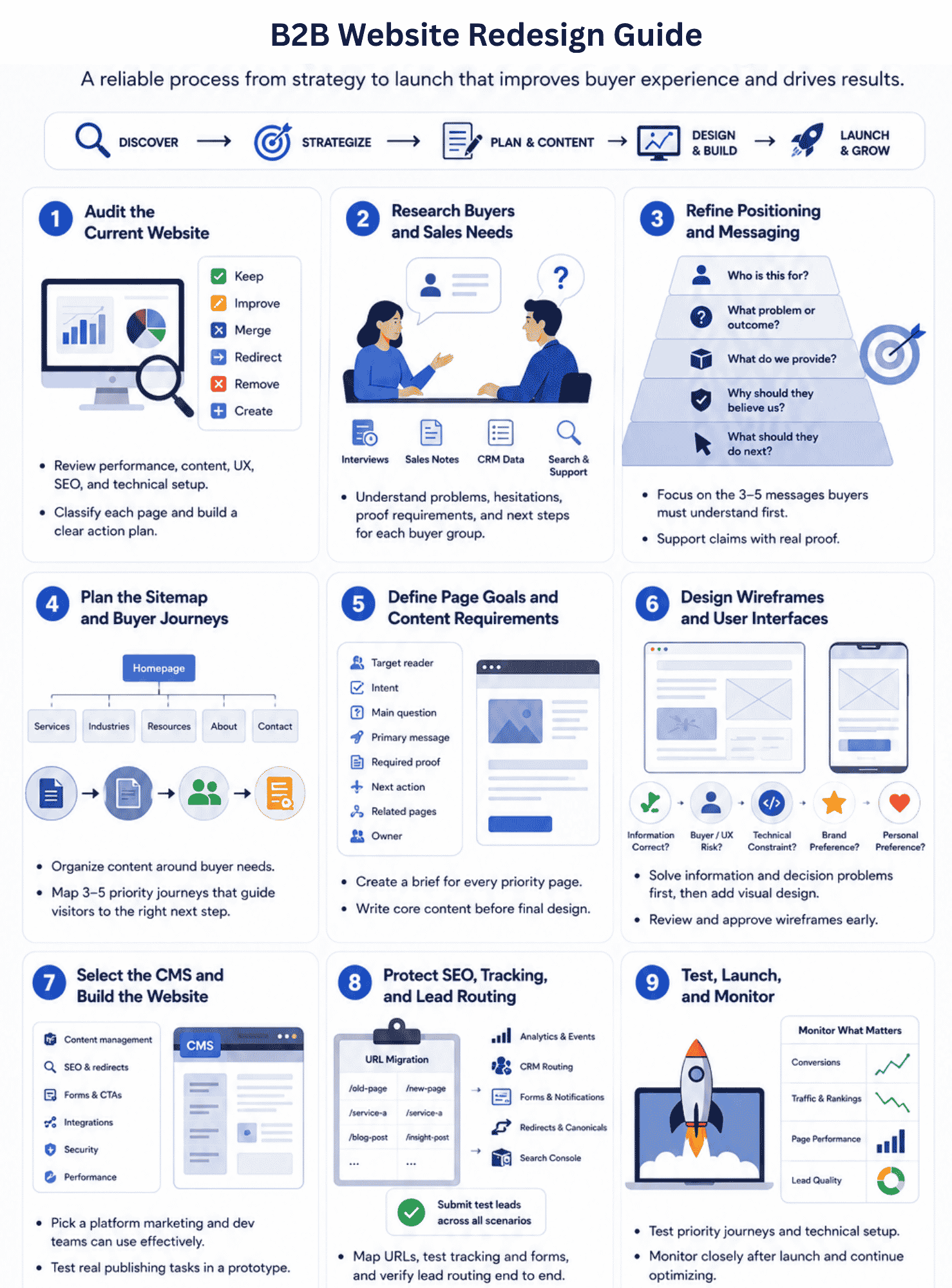
1. Audit the Current Website
Start by identifying what already works and what is creating friction.
Review:
- Traffic, rankings, and backlinks
- Conversions on priority pages
- Form completion and CRM delivery
- Navigation and key buyer journeys
- Content accuracy and duplication
- Mobile usability and page performance
- CMS and integration limitations
Do not audit every page with the same depth. Begin with the top 20–30 URLs by organic traffic, conversions, backlinks, or sales importance.
Classify each page as:
- Keep: Performs well and remains accurate
- Improve: Has value but needs better content or UX
- Merge: Overlaps with another page
- Redirect: Should move to a more relevant destination
- Remove: Has no meaningful audience or value
- Create: A buyer need is not currently addressed
A page that looks outdated may still generate qualified leads. Never remove it before understanding its search and sales value.
2. Research Buyers and Sales Needs
Buyer research should explain what prospects need before they are ready to contact sales.
Useful inputs include:
- Customer interviews
- Sales-call recordings and notes
- Lost-deal reasons
- CRM data
- On-site search terms
- Support questions
- Search queries bringing visitors to the site
You do not always need a large research program. Interviews with five to eight recent customers, combined with feedback from two or three salespeople, can reveal repeated questions and decision barriers.
For each main buyer group, document:
- The problem that brings them to the website
- What they need to understand
- What makes them hesitate
- What proof they expect
- What action they are ready to take
A founder may care about business risk and delivery speed, while a technical buyer wants architecture, integration, security, and maintenance details. One generic service page rarely satisfies both.
3. Refine Positioning and Messaging
The website should communicate who the company serves, what it helps them achieve, and why its approach is credible.
A practical messaging hierarchy is:
- Who is this for?
- What problem or outcome does it address?
- What does the company provide?
- Why should the buyer believe it?
- What should the buyer do next?
Avoid using the homepage to list every capability equally. Select the three to five messages that buyers must understand first, then move detailed information into service, industry, solution, and proof pages.
Sales feedback is particularly valuable here. If sales repeatedly needs to clarify delivery models, pricing logic, onboarding, security, or implementation time, the website should address those questions before the first call.
Support claims with evidence such as client outcomes, case studies, certifications, team expertise, delivery processes, or specific examples. Phrases such as “innovative,” “customer-centric,” and “end-to-end” add little value without proof.
4. Plan the Sitemap and Buyer Journeys
A sitemap organizes content. A buyer journey explains how visitors move between that content.
Begin with the main reasons people visit the site. A typical B2B structure may include:
- Services or solutions
- Industries or use cases
- Case studies
- Insights or resources
- Company and trust information
- Contact or consultation paths
Then map three to five priority journeys. For example:
Industry article → relevant service page → case study → consultation form
Or: Homepage → solution page → delivery process → contact form
Do not force every visitor toward an immediate sales call. Early-stage buyers may need a case study, guide, technical explanation, or cost overview before they are ready to speak with sales.
Keep the main navigation focused. If it contains more than six or seven primary choices, review whether internal departments are shaping the structure more than buyer needs.
5. Define Page Goals and Content Requirements
Every priority page should have one main audience and one primary job.
Before writing or designing it, create a brief that defines:
- Target reader
- Search or campaign intent
- Main question the page answers
- Primary message
- Required proof
- Desired next action
- Related pages
- Page owner
For example, a service page may need to help a qualified buyer decide whether the company can handle their project. Its content should therefore cover relevant problems, capabilities, delivery approach, proof, common concerns, and the next step—not simply describe the service.
Write the core content before the visual design is finalized. Placeholder copy often produces attractive layouts that cannot support the actual message once real content is added.
For a medium-sized site, prioritize around 10–20 revenue- or traffic-critical pages before spending equal effort on every low-value page.
6. Design Wireframes and User Interfaces
Wireframes should solve information and decision problems before visual styling begins.
Start with:
- Content hierarchy
- Page sections
- Navigation
- Proof placement
- Calls to action
- Mobile behavior
A useful review question is not “Do we like this layout?” but:
“Can the target buyer understand the offer, find evidence, and identify the next step?”
Approve wireframes before investing heavily in polished interfaces. Changing the page structure at the wireframe stage is cheaper than rebuilding designed and developed components later.
Businesses without an internal design team may use professional UI/UX design services to translate buyer research and content requirements into usable page flows.
During review, collect comments in one location and separate them into:
- Incorrect information
- Buyer or usability risk
- Technical constraint
- Brand preference
- Personal preference
Centralized visual feedback tools can reduce confusion caused by comments spread across email, chat, screenshots, and presentation files.
7. Select the CMS and Build the Website
Choose technology based on operating needs, not only the development team’s preferred platform.
Marketing should be able to:
- Create pages from approved components
- Edit metadata and URLs
- Manage redirects
- Publish without developer support
- Control forms and calls to action
- Add localized content where required
Development should evaluate:
- Security and update requirements
- Integration support
- Performance
- Hosting and deployment
- User permissions
- Maintainability
- Expected traffic and content growth
Ask the marketing team to complete three common publishing tasks in a CMS prototype before approving the platform. For example: create a landing page, update a service page, and change a form. A short test can expose workflow problems before the full build begins.
Projects involving customer portals, account areas, dashboards, or complex business workflows may require broader web app development services rather than a conventional marketing-site implementation.
8. Protect SEO, Tracking, and Lead Routing
SEO and lead infrastructure should be planned during development, not checked the day before launch.
Create a URL migration sheet containing:
- Current URL
- New URL
- Page status
- Redirect destination
- Title and meta description
- Canonical URL
- Target keyword or purpose
- Responsible owner
Preserve valuable URLs where possible. When a URL must change permanently, map it to the closest relevant destination rather than redirecting every removed page to the homepage. Google recommends preparing URL mappings and server-side permanent redirects for site moves involving URL changes.
Also verify:
- Analytics events
- Form submissions
- CRM fields and ownership
- Campaign parameters
- Consent settings
- Email notifications
- Call tracking
- Thank-you pages
- Search Console access
Submit at least five test leads covering different forms, devices, and routing conditions. Confirm not only that the form displays a success message, but that the correct CRM record, source data, owner, and notification are created.
9. Test, Launch, and Monitor
Do not test every page equally. Give priority to the journeys that affect revenue, traffic, and trust.
Before launch, test:
- Homepage and primary service pages
- Main navigation
- Contact and demo forms
- CRM routing
- Mobile layouts
- Browsers and screen sizes
- Redirects
- Analytics events
- Consent tools
- Downloadable resources
- Error and confirmation messages
Use a clear launch rule. For example:
- No critical defects
- No broken priority journeys
- All revenue forms verified
- Redirects tested
- Analytics confirmed
- Named rollback owner available
Page performance should be tested using both lab tools and real-user data after launch. Core Web Vitals measure loading performance, interaction responsiveness, and visual stability, but a single homepage score should not be treated as proof that the whole website performs well.
Monitor the site daily during the first week, then review performance after 30, 60, and 90 days. Watch:
- Qualified conversions
- Lead routing failures
- Organic traffic and rankings
- Indexation and crawl errors
- Page performance
- Engagement on priority journeys
- Sales feedback
- CMS publishing issues
Some ranking fluctuation can occur after significant URL changes while search engines recrawl and reindex the site, so teams should monitor the migration rather than judge SEO performance from the first few days alone.
The launch is not the end of the redesign. It is the point when the team can begin validating whether the new structure, messaging, and experience improve real buyer behavior.
How Long Does a B2B Website Redesign Take?
A focused B2B website redesign may take 8–12 weeks, while a larger project involving new positioning, content, CMS development, and integrations often needs 12–20 weeks. Complex multilingual or platform migration projects can take longer.
These are planning ranges, not fixed benchmarks. The schedule depends less on the number of pages than on how many decisions, templates, integrations, and approval layers the project includes. B2B website redesign timeline:
| Phase | Typical duration | Main output |
| Audit and discovery | 1–2 weeks | Goals, baseline data, risks, and scope |
| Buyer and content strategy | 1–3 weeks | Buyer needs, messaging, sitemap, and page list |
| Page briefs and copy | 2–5 weeks | Approved content for priority pages |
| Wireframes and UI design | 2–4 weeks | Responsive layouts and design system |
| Development | 3–7 weeks | CMS templates, components, and integrations |
| Content migration and QA | 1–3 weeks | Migrated pages, redirects, tracking, and testing |
| Launch and stabilization | 1–2 weeks | Production release, fixes, and monitoring |
Several phases can overlap. For example, development can begin on approved components while copy is still being finalized for lower-priority pages.
Build a 10–15% schedule buffer for delayed approvals, integration issues, and launch fixes. This is more realistic than planning every phase at full capacity.
B2B Website Redesign Launch Checklist
A launch checklist should protect revenue journeys, search visibility, and lead data. Do not delay launch for minor visual imperfections, but do not proceed with broken forms, incorrect redirects, or unreliable tracking.
Content and Buyer Journeys
- Priority pages contain approved copy and proof
- Prices, service details, team information, and legal text are current
- Primary and secondary calls to action lead to the correct destination
- Navigation works on desktop and mobile
- Sales has reviewed key service pages, case studies, and contact paths
- No placeholder text or temporary images remain
Test at least three priority journeys, such as:
- Organic article → service page → contact form
- Homepage → case study → consultation request
- Campaign landing page → form → CRM assignment
SEO and Migration
- Old and new URLs are recorded in one migration sheet
- Changed URLs use relevant permanent redirects
- Page titles, descriptions, headings, and canonicals are checked
- Internal links point to final URLs
- XML sitemap contains live, indexable pages
- Production pages are not accidentally marked noindex
- Robots.txt does not block required content
- Search Console and analytics access are confirmed
Google recommends permanent server-side redirects, such as 301 or 308 redirects, when a page has permanently moved. The new sitemap should also be submitted through Search Console so processing issues can be monitored.
Forms, CRM, and Tracking
- Every form creates the correct CRM record
- Source, campaign, and page information are retained
- Leads are assigned to the correct person or team
- Confirmation emails and internal alerts are delivered
- Thank-you pages and conversion events work
- Consent preferences are recorded correctly
- Phone numbers, booking links, and chat tools work
Submit at least five test leads using different forms and devices. A visible success message does not prove that the lead reached the CRM or the correct sales owner.
Technical Quality
- HTTPS works across all pages
- Mobile layouts are checked on real devices
- Main browsers are tested
- Images are compressed and sized correctly
- Broken links and missing files are fixed
- Error pages are configured
- Backups and a rollback plan are available
- Security, CMS, and plugin updates are complete
Measure performance on several important page types rather than only the homepage. Core Web Vitals assess loading, interaction responsiveness, and visual stability, and field data is more representative of real visitor experience than a single laboratory test.
Launch Ownership
Before launch, name:
- One person who gives the final go-ahead
- One technical owner who can roll back the release
- One marketing owner monitoring forms and analytics
- One SEO owner checking redirects, indexing, and traffic
- One sales or RevOps owner verifying lead delivery
Monitor the site closely for the first 48 hours, then review traffic, forms, rankings, performance, and lead quality after 7, 30, 60, and 90 days.
Common B2B Website Redesign Mistakes
Most redesign problems begin before development. They usually come from unclear decisions, late content, or treating the website as a design project rather than a shared sales and marketing system.
Starting With the Homepage Design
Teams often request several homepage concepts before agreeing on positioning, target buyers, or page goals. This produces attractive layouts built around placeholder content.
Define the messaging and content hierarchy first. The homepage should reflect the strategy, not become the place where the strategy is invented.
Giving Too Many People Approval Authority
Stakeholder input is useful, but allowing eight or ten people to approve every page creates contradictory feedback and slow decisions.
Keep final approval with one project owner and a small group of three to five core decision-makers. Specialists can review relevant areas without controlling the entire project.
Leaving Content Until Development
Content delays are one of the most common causes of missed launch dates. Real copy also changes section length, page hierarchy, components, and mobile behavior.
Approve content for the top 10–15 priority pages before full development. Lower-value pages can be migrated or improved later.
Ignoring Sales Feedback
Marketing data explains what visitors do, but sales conversations reveal why buyers hesitate.
If prospects repeatedly ask about pricing structure, delivery process, security, implementation time, or relevant experience, the redesigned website should address those topics. Otherwise, it may look better while leaving the same buyer questions unanswered.
Replacing High-Performing Pages Without Evidence
Do not remove or completely rewrite a page only because it looks inconsistent with the new design.
Check whether it generates organic traffic, backlinks, conversions, or sales engagement. Preserve its useful content and URL where possible, then improve its structure and presentation.
Selecting Technology Before Defining Requirements
Choosing a CMS too early can force the project around platform limitations.
First document publishing workflows, user permissions, localization, SEO controls, forms, integrations, and custom functionality. Then evaluate which technology supports those needs with the least unnecessary complexity.
Treating Launch as Project Completion
Even well-tested sites reveal issues after real buyers, devices, and campaigns begin using them.
Reserve time and budget for at least 30 days of post-launch stabilization, followed by ongoing conversion, content, and SEO improvements. A redesign creates a stronger foundation; it does not eliminate the need for continuous optimization.
Frequently Asked Questions
Should Website Content Be Written Before Design?
Core content should be drafted before final UI design. Designers need realistic headlines, proof, page sections, and calls to action to create layouts that support the message rather than placeholder copy.
How Often Should You Redesign Your Website?
Review the website every 6–12 months, but do not redesign on a fixed schedule. Consider a full redesign when positioning, buyer journeys, content structure, and technology no longer support the business.
How Can You Redesign a Website Without Losing SEO?
Audit valuable pages before making changes, preserve strong URLs where possible, prepare a complete redirect map, retain useful content, update internal links, and monitor rankings and indexation after launch.
Turn Your B2B Website Redesign Into a Business Improvement
A successful B2B website redesign starts with clear business goals, buyer needs, and measurable problems—not visual trends.
Before changing layouts or technology, decide what the website must help marketing, sales, and customers do better. Preserve pages and systems that already perform, then focus development effort on the journeys that influence trust, qualification, and revenue.
The project should also continue after launch. Use real traffic, lead data, sales feedback, and search performance to improve weak pages over the following 30, 60, and 90 days.
When strategy, content, UX, technology, SEO, and lead routing are planned together, the redesigned website becomes more than a new interface. It becomes a stronger platform for marketing and sales growth.